How to Modify an Outstanding Order

Generally speaking, we provide a ‘modification window’ of less than 18 hours from when your custom product is ordered until it can no longer be modified. At that point, the order data is sent to our Production Team and fabrics will be cut, sewing will begin, etc.

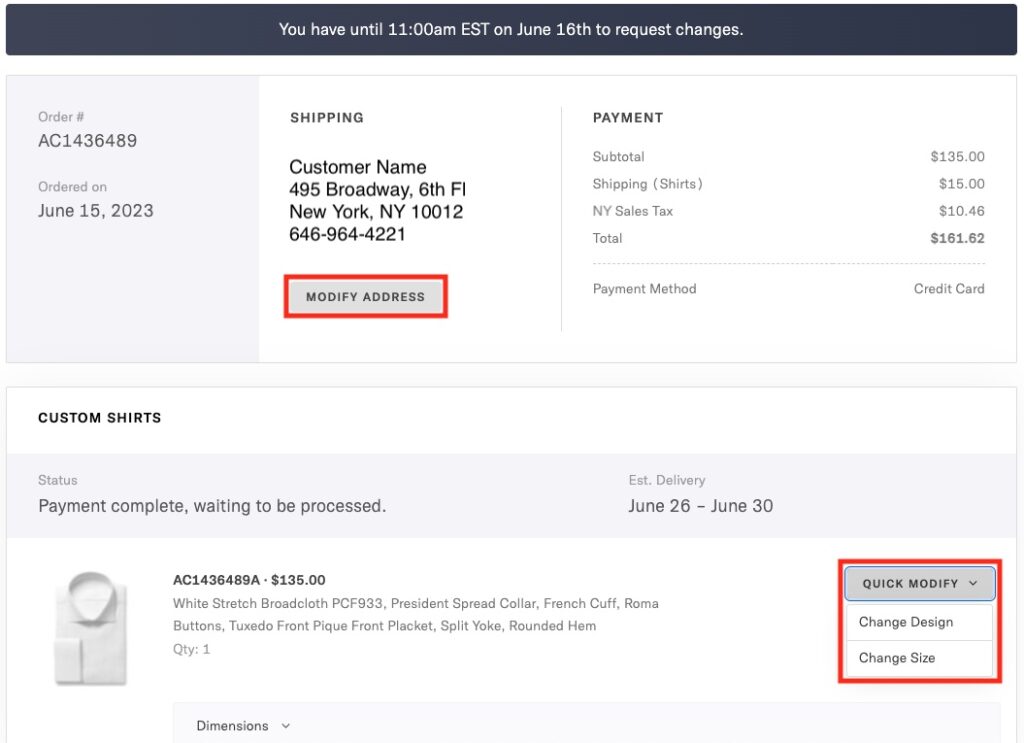
Order Status: Payment complete, waiting to be processed

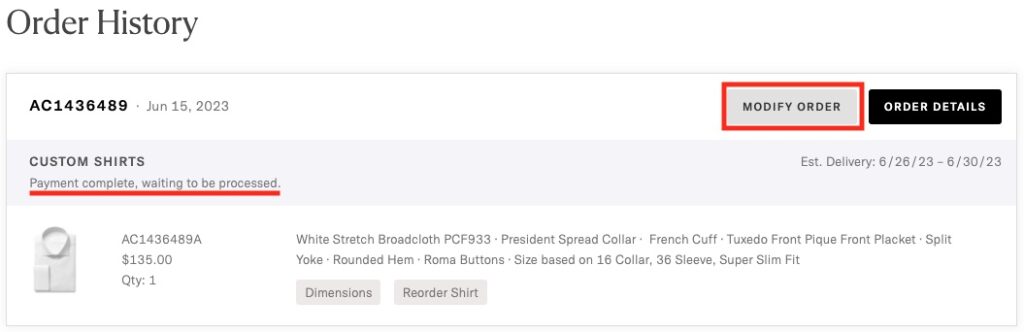
From your Order History, locate your latest order. If the order status is ‘Payment complete, waiting to be processed.’ the order is still in the modification window and can be quickly edited. Click the Modify Order button to make changes.

Order status 'Payment complete, waiting to be processed." Click 'Modify Order' button to customize a order.

From there, you can modify the shipping address by clicking Modify Address, or you can change the style or size of any item by clicking Quick Modify, then Change Design or Change Size.

Click 'Modify Address' if you would like to change the shipping address. Click 'Quick Modify' and select 'Change Design' or 'Change Size' from the drop down.

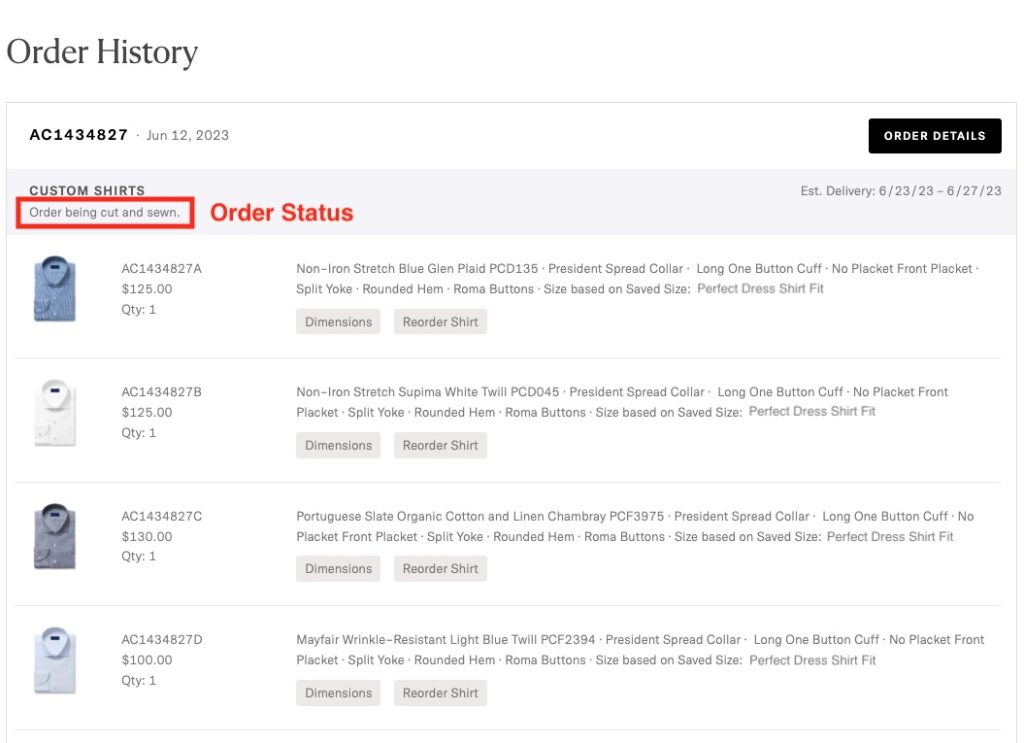
Order Status: Order being cut and sewn

If the order status is ‘Order being cut and sewn’ the order is currently in production and can no longer be modified.

Order status 'Order being cut and sewn.'

If you would like to cancel the order and have it replaced with changes, please Contact Us as soon as possible. We may be able to accommodate this request if you reach out soon enough.

The Difference Between Size Profiles and Style

Size must be selected for any custom product before it can be added to your bag. The style, however, will reflect the photograph of the shirt, pant, jacket, or suit in the product description unless explicitly modified before adding it to the bag.

Custom Products: Size Required

Size is required for all custom product (shirt, pant, jacket, or suit) orders–no matter if you choose a ‘standard size’, Smart Size, or your heavily modified custom size profile–as they all are made to order in your chosen size.

Standard Sizes information.

Tips for updating and managing your Saved Sizes.

Style Adjustments: Optional

You have the option to modify many of the style elements of any shirt, pant, jacket, or suit you see on the Proper Cloth website. If you simply select a size and add it to the bag, the item’s style will reflect the photographed product on the product page.

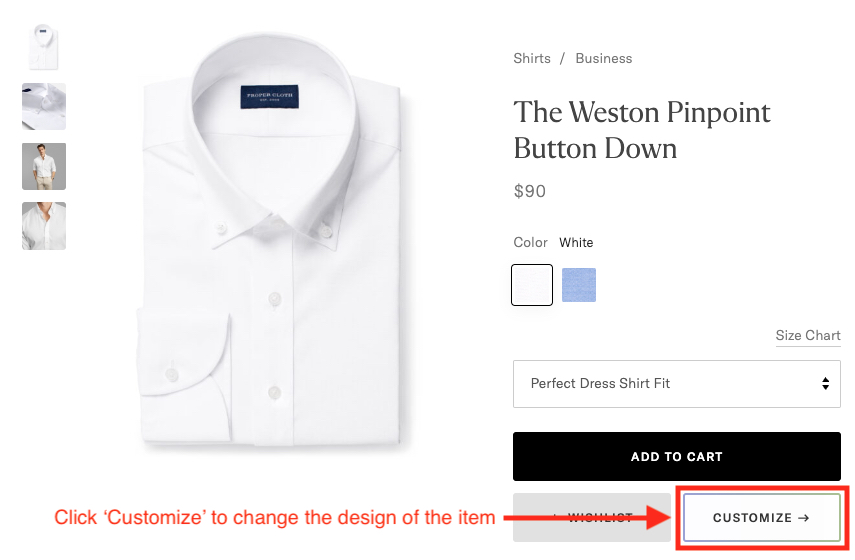
For example, if you like the custom product’s fabric but wish to change the collar, cuff, lapel, buttons, pocket, waistband, etc., click the ‘Customize –>’ button to edit the design as you wish.

More information on how to customize the style of Proper Cloth garments.

Size Profile Dimensions/Parameters

You can update and manage your saved sizes for shirts, pants, and jackets here. Below are lists of the dimensions and parameters that can be adjusted in your saved sizes.

Shirts:

  • Collar Around
  • Sleeve Length
  • Yoke Width
  • Chest Width
  • Midsection Width
  • Back Length
  • Sleeve Width
  • Cuff Around
  • Bottom Width
  • Watch Allowance
  • Shoulder Slope
  • Forearm
  • Upper Sleeve Fit
  • Rear Pleats
  • Back Darts
  • Neck Posture
  • Chest Posture
  • Top Button Placement

Pants:

  • Waist Width
  • Hip Width
  • Thigh Width
  • Knee Width
  • Leg Opening Width
  • Front Rise
  • Back Rise
  • Inseam Length

Jackets:

  • Shoulder Width
  • Chest Width
  • Midsection Width
  • Hip Width Width
  • Center Back Length
  • Sleeve Length
  • Sleeve Bicep Width
  • Shoulder Slope
  • Neck Posture
  • Chest Posture
  • Button Stance

Custom Style Parameters

The following are style parameters. These are the various areas of each garment type’s design that can be modified by clicking the ‘Customize –>’ button on a product page.

Shirts:

  • Collars
  • Cuffs [also used to toggle long vs. short sleeve]
  • Front / Placket
  • Pocket(s)
  • Yoke
  • Bottom Hem
  • Buttons
  • Monograms
  • Fabric Accents [special fabrics inside collars and/or cuffs]

Pants:

  • Casual Pants
    • Style [chino, 5-pocket, jogger]
    • Front Pockets
    • Back Pockets
    • Fly
    • Buttons
    • Waistband
    • Cargo Pockets
    • Waist Closure
    • Pocket Lining
    • Hem
  • Dress Pants
    • Style [dress pants, tuxedo pants]
    • Hem Style (cuff, no cuff)
    • Waistband
    • Buttons
    • Front Style
    • Fly
    • Suspender Buttons
    • Waist Closure
    • Pocket Style

Jackets:

  • Construction [half, full canvas, unstructured]
  • Style [lapel style, tuxedo, double-breasted, etc.]
  • Interior Style [lining style]
  • Rear Vent Style
  • Exterior Pocket Style
  • Buttons
  • Monogram
  • Melton
  • Interior Pocket Lining [lining fabric color]
  • Interior Pocket Style
  • Sleeve Button Style [1-4 buttons, unfinished sleeve, etc]

How to Quickly Re-Order the Same Size and Style Shirt

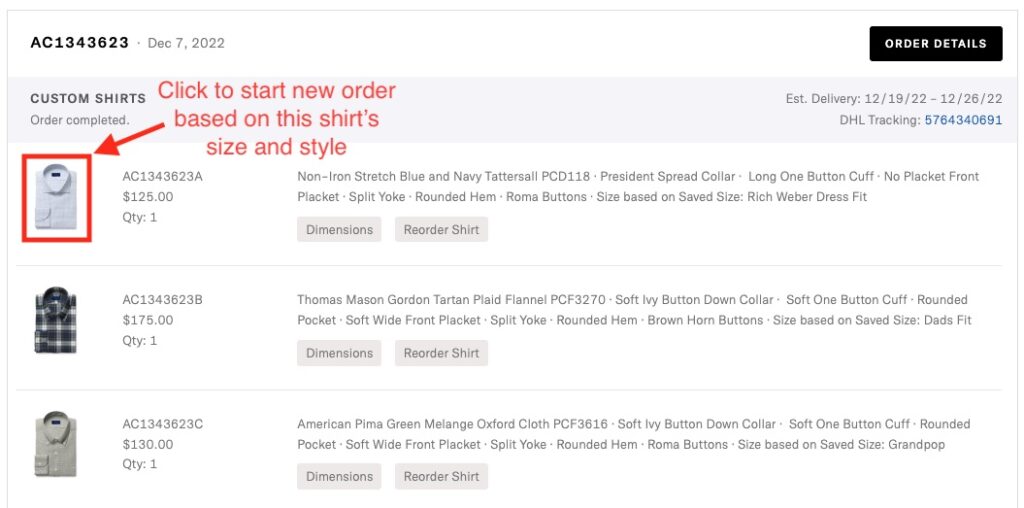
If you’d like to order the same size and style custom shirt again, from your Order History, click the thumbnail image of the shirt you’d like to use as the template.

You will then be brought to the Design-A-Shirt interface. Click the Fabric tab to filter or search for a new fabric to apply. The Style and Size tabs will stay the same as the original ‘template’ shirt, unless you decide to modify them. From the Summary tab, review the details quickly and then click Add to Bag. 

How to Request Custom Garments On Hold

You’ve carefully evaluated your ‘send first’ custom garment or remake and you’re ready to request the balance of your order.

  1. Log into your account
  2. From the top right menu (hover the mouse over your name) select “Order History“
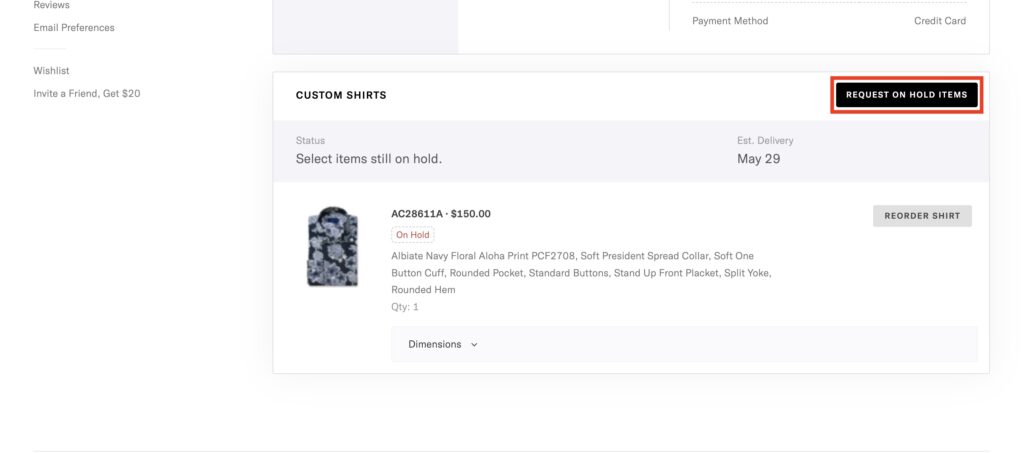
  3. Click the “Order Details” link next to the original order number
  4. Click the “Request On Hold Items” button
  5. Follow the prompts through to complete your request.
Select "request on hold items" button.

Modify Your On Hold Items

Upon requesting the garments on hold from your Order History, you will be prompted to confirm the desired size profile and the style details of each item. At this point, you can change the fabric (shirts), collar, cuff, lapel, pockets, buttons, and other style details for each garment on hold. You’ll also get a chance to change or update your shipping address.

While requesting your ‘On Hold’ items you’ll have the opportunity to modify the item sizes, item design/style options, and shipping address.

Can I change my fabric or style details when requesting a remake?

With Proper Cloth’s Perfect Fit Guarantee, we offer a complimentary remake on your first order to ensure a perfect fit. In the event that you decide to use your free remake to adjust the size of your first custom item, you’ll be glad to know that we can remake the garment with not only a different size, but a different collar, cuff, buttons, or even fabric.

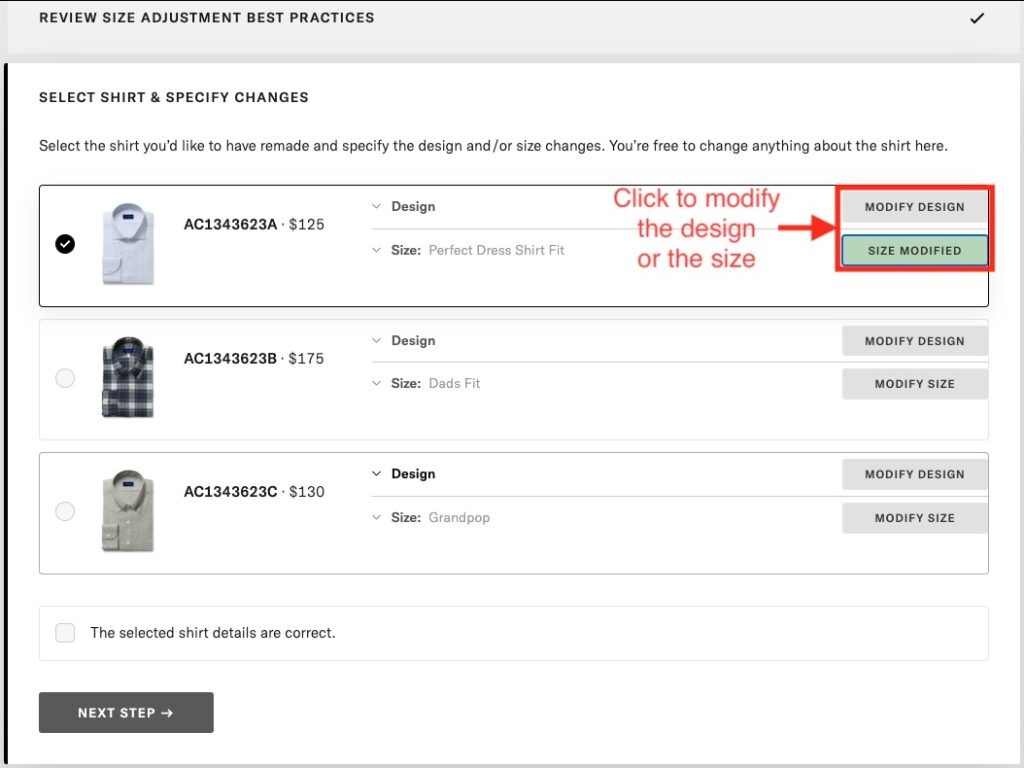
Changing Remake Order Details

At Step 4 of the Remake Request process, you will have a chance to modify the fabric and modify the style details for your remake item.

Select modify design or size modified button.

Note: Changing to a more expensive fabric or applying design upgrades (e.g. MOP buttons) will require a payment method to be entered/selected to cover the difference in cost from the initial order. Store Credit will be provided if a less expensive fabric or design option is chosen.

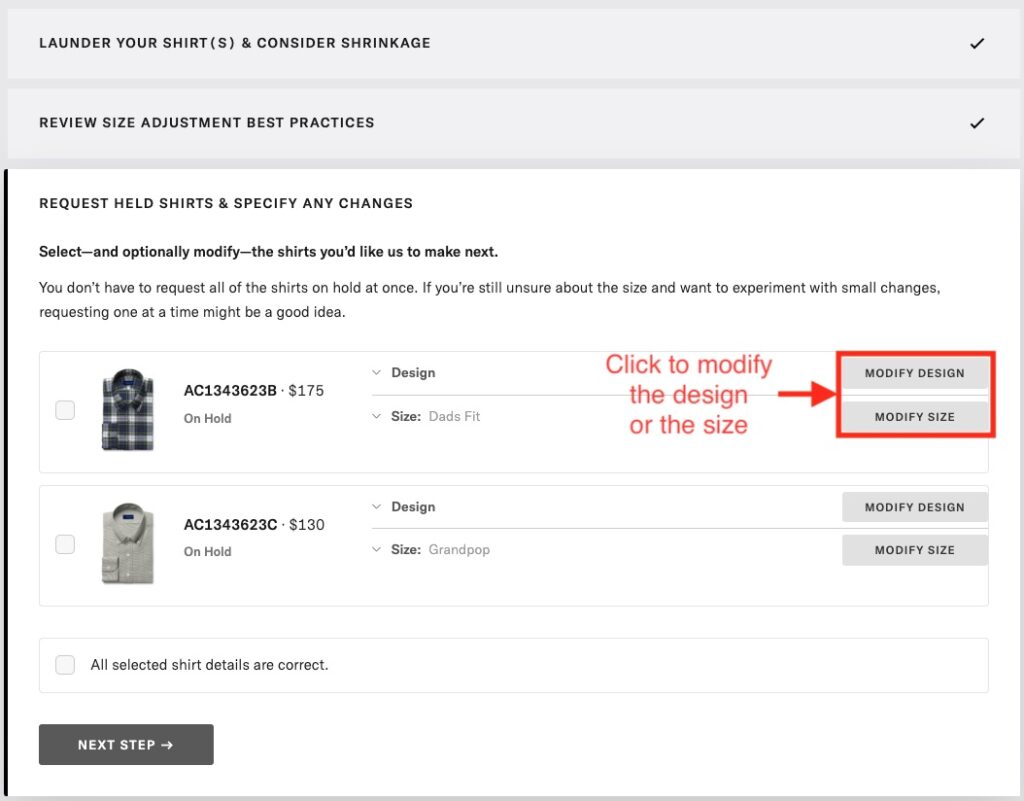
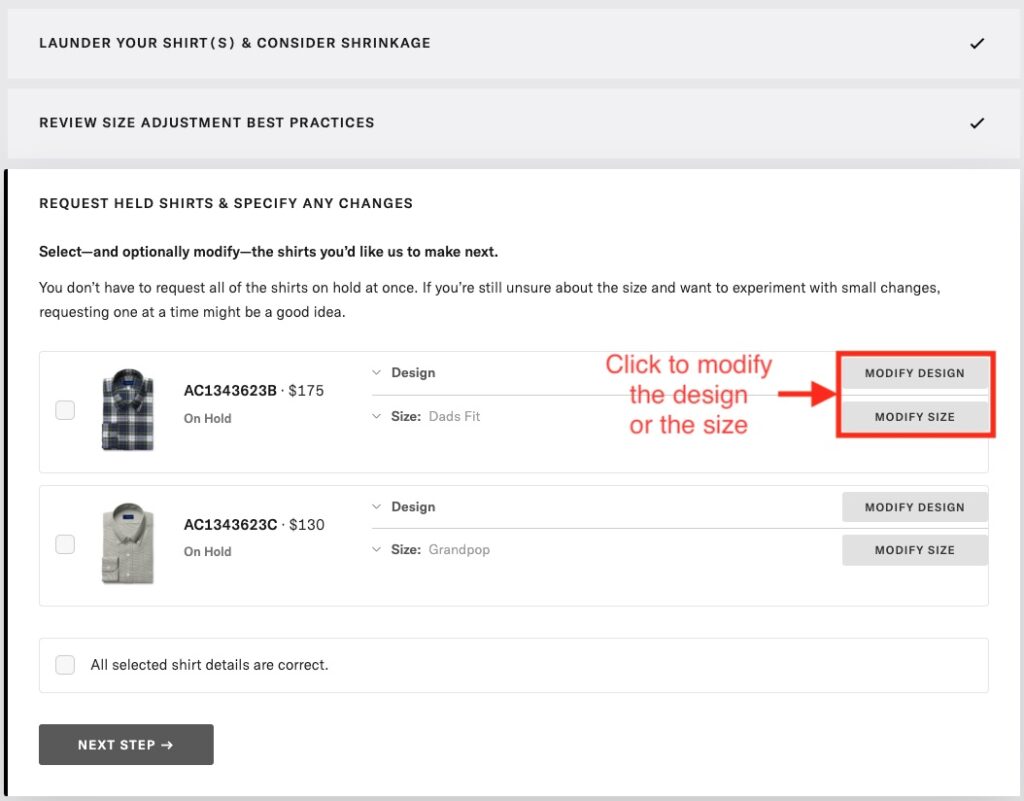
Changing Details of Your Garments On Hold

Now, if you selected “Send First” because you ordered multiple custom items in your first Proper Cloth purchase, you’ll be happy to know that you have a second chance to review the details of the items on hold before releasing them to production. Upon requesting the garments on hold from your Order History, you will be prompted to confirm the desired size profile and the style details of each item. At this point, you can change the fabric, collar, cuff, and other style details for each garment on hold. Finally, you’ll also get a chance to change or update your shipping preferences if needed.

Select modify design or size modified button.

How to Customize the Style of a Garment

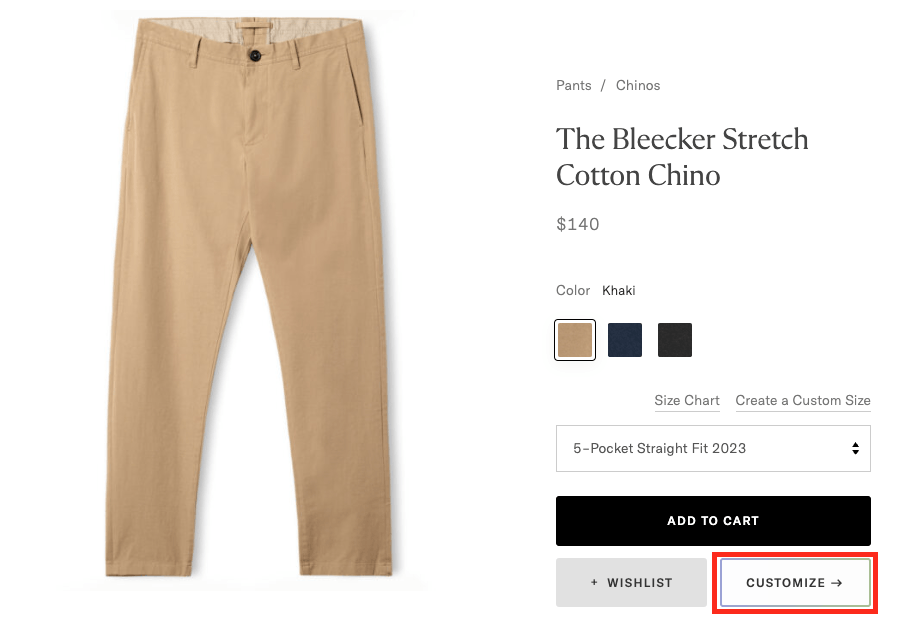
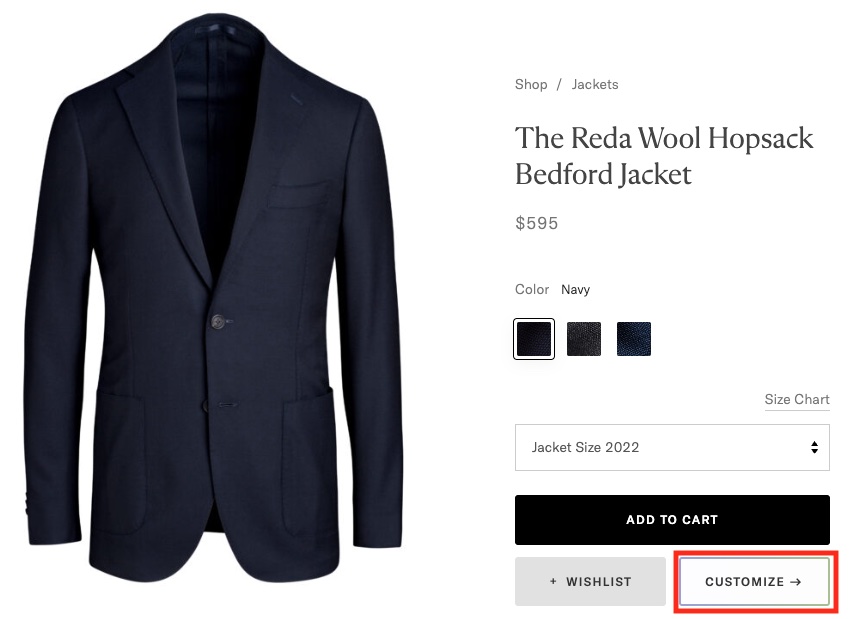
Click ‘Customize’ to change the style of a custom shirt, jacket, or pant

The ‘Shop’ gallery features a variety of custom garments and stocked products that Proper Cloth offers. For custom-made garments like shirts, pants, and tailored jackets, the products have been designed, constructed, and photographed, allowing customers to quickly order them, as-pictured, in their custom size.

Customizing Shirts

To change the design of a photographed product, click the ‘Customize ->’ button to modify the design as you wish.

Click 'Customize' button to change the design of the item.

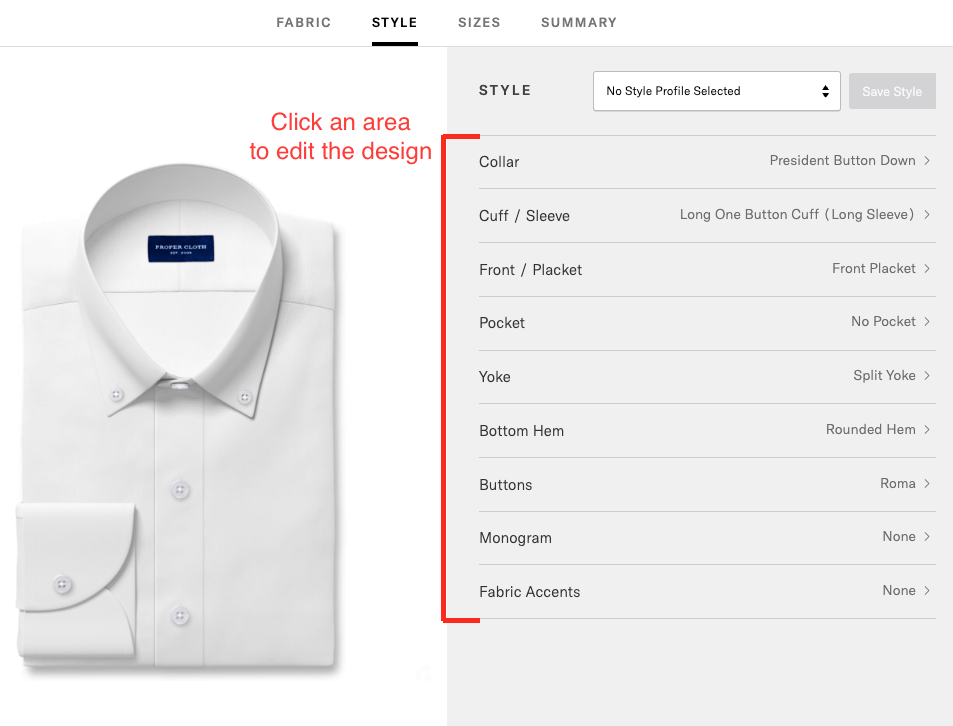
From there, you can click any of the listed areas of the shirt to change the design.

Click an area to edit the design.

Shirts designs can be modified in the following areas:

Customizing Pants

To change the design of a photographed product, click the ‘Customize ->’ button to modify the design as you wish.

Click 'Customize' button to change the design of the item.

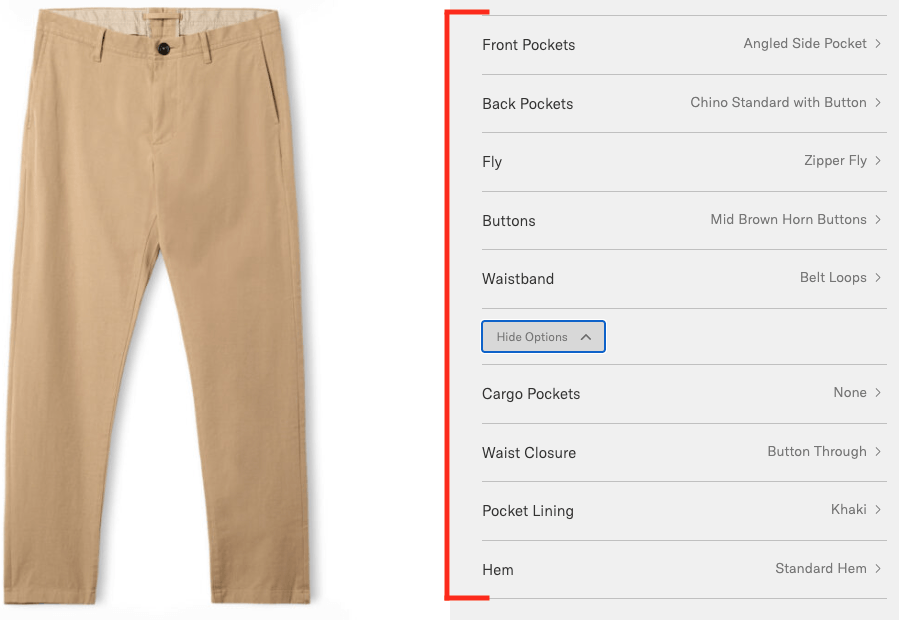
From there, you can click any of the listed areas of the pant to change the design.

Casual pant design options.

Casual Pants can be modified in the following ways:

  • Style [chino, 5-pocket, jogger]
  • Front Pockets
  • Back Pockets
  • Fly
  • Buttons
  • Waistband
  • Cargo Pockets
  • Waist Closure
  • Pocket Lining
  • Hem
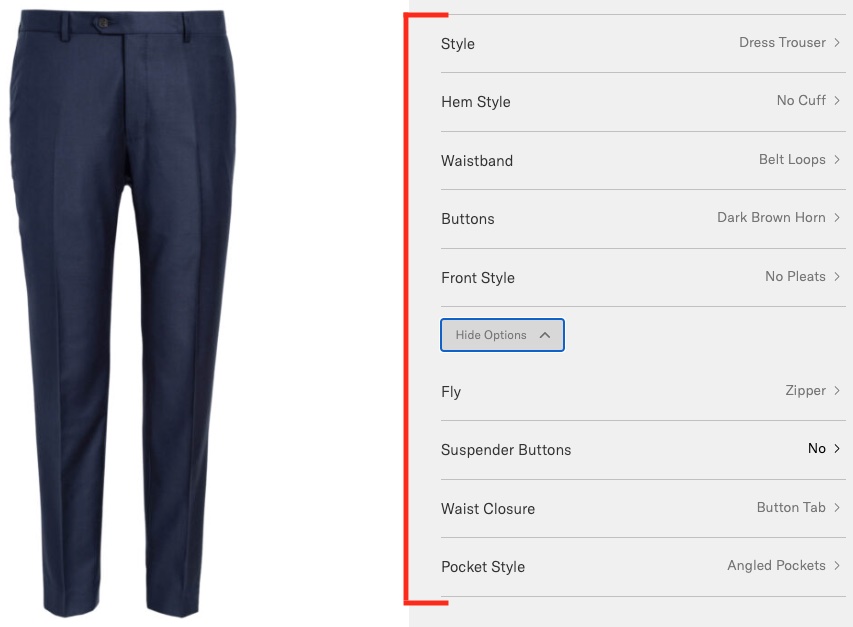
Dress pant design options.

Dress Pants can be modified in the following ways:

  • Style [dress pants, tuxedo pants]
  • Hem Style (cuff, no cuff)
  • Waistband
  • Buttons
  • Front Style
  • Fly
  • Suspender Buttons
  • Waist Closure
  • Pocket Style

Customizing Jackets

Click 'Customize' button to change the design of the item.

From there, you can click any of the listed areas of the jacket to change the design.

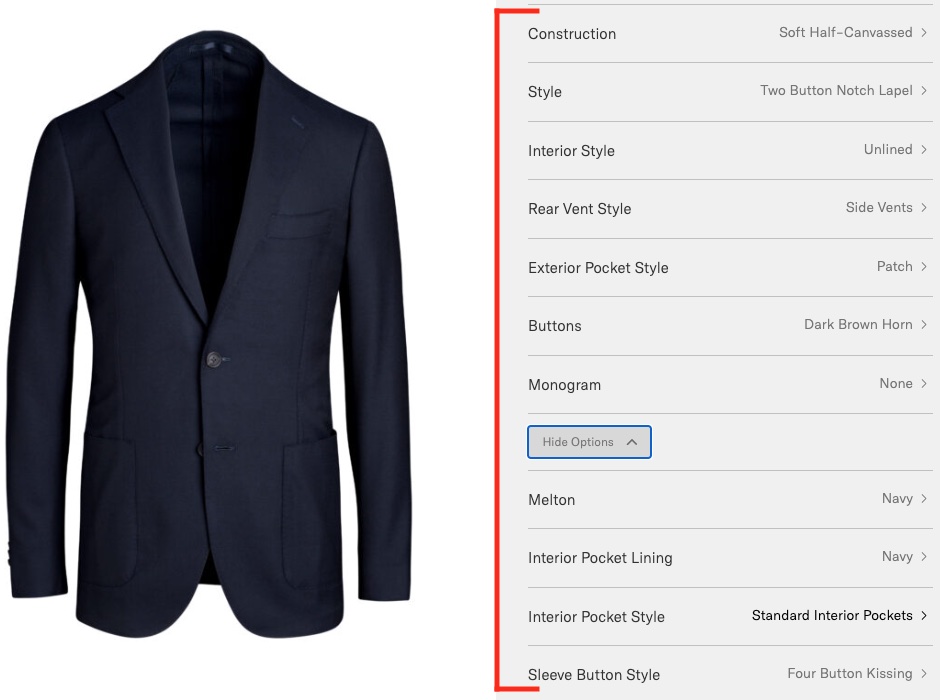
Jacket design options.

Jackets can be modified in the following ways:

  • Construction [half, full canvas, unstructured]
  • Style [lapel style, tuxedo, double breasted, etc.]
  • Interior Style [lining style]
  • Rear Vent Style
  • Exterior Pocket Style
  • Buttons
  • Monogram
  • Melton
  • Interior Pocket Lining [lining fabric color]
  • Interior Pocket Style
  • Sleeve Button Style [1-4 buttons, unfinished sleeve, etc]

Remake Requested – How to Return the Original Item

Per our Return and Remake Policy, customers must agree to send back the original custom garment when a remake is provided.

Tips

  • Submit a Return Request through your Proper Cloth account, detailing the appropriate reason for the return and choosing ‘Complimentary Remake’ as the desired resolution.
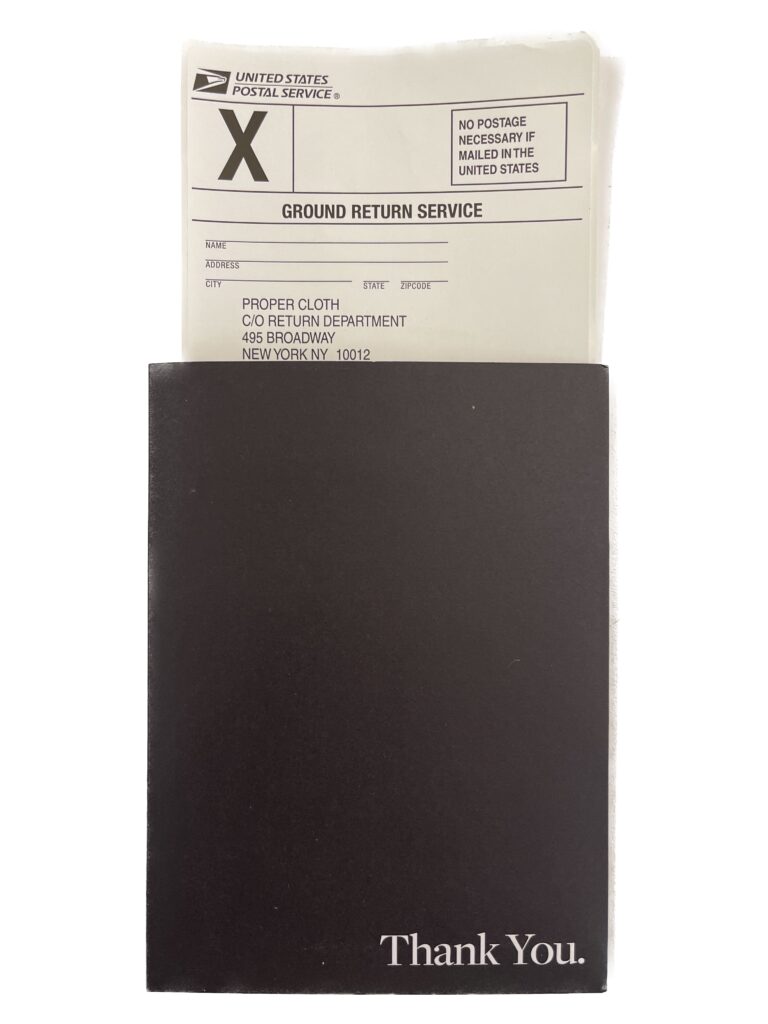
  • Please use the prepaid return shipping label included in the packaging of your original custom order shipment.
  • If you’re reusing the box your Proper Cloth order arrived in, be sure to either remove the original postage label or apply the label on top of the original.
  • No worries if the item has been worn once or twice.
  • Send the item back within 30 days of your remake order date.
  • If your order didn’t arrive with a return shipping label, or you need a new one, please select “I need a new return shipping label” in the Return Request process.

Standard Sizes, Types of Fit, and Size Charts

Standard Sizes – Dress Shirts

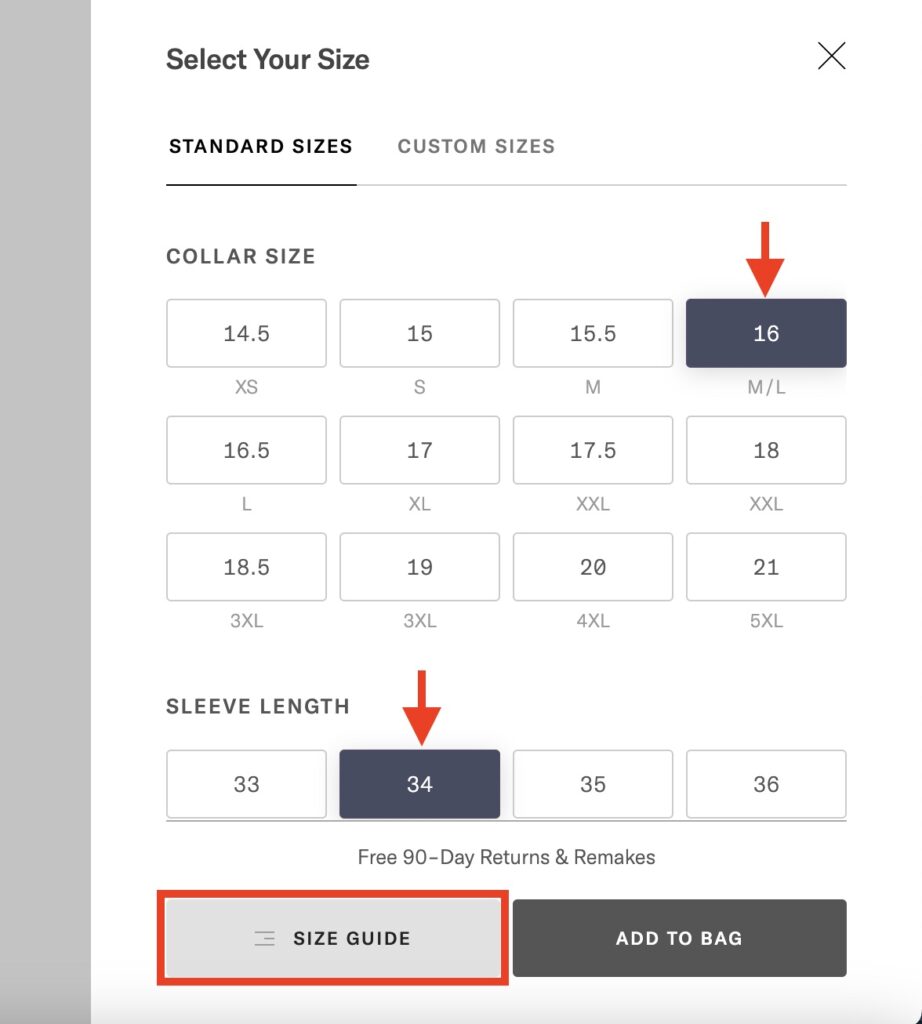
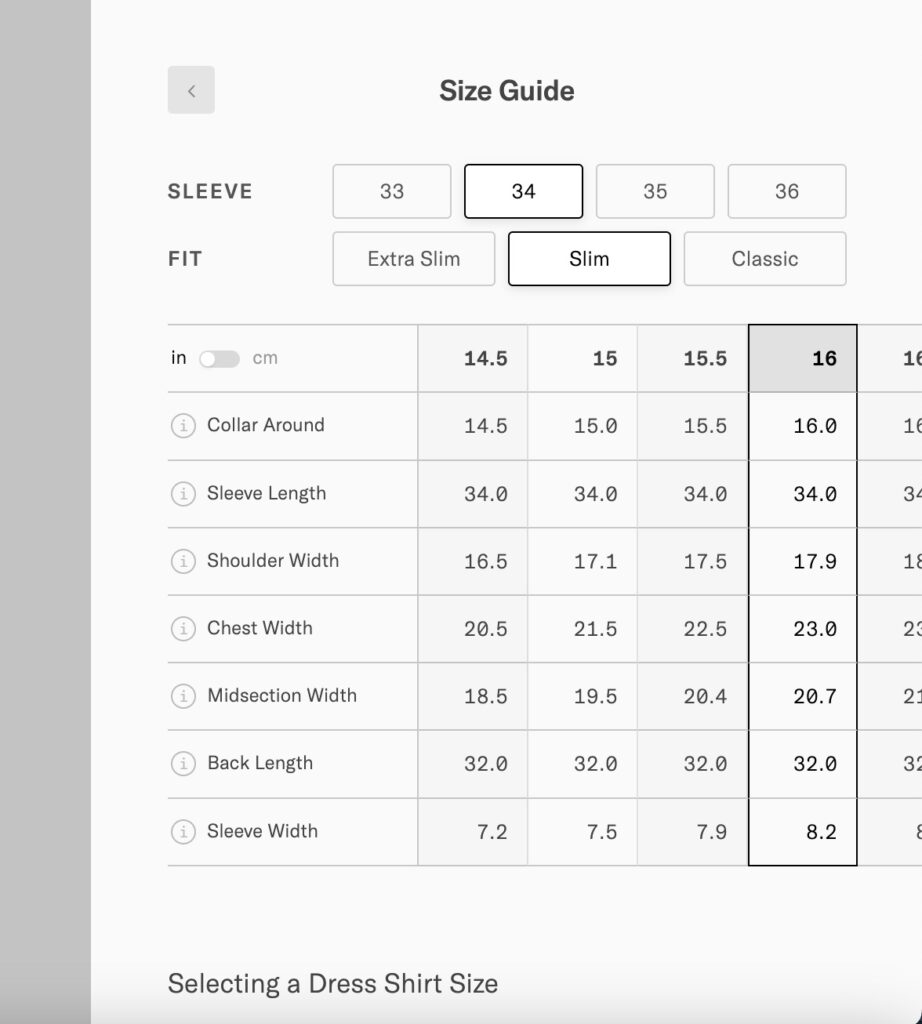
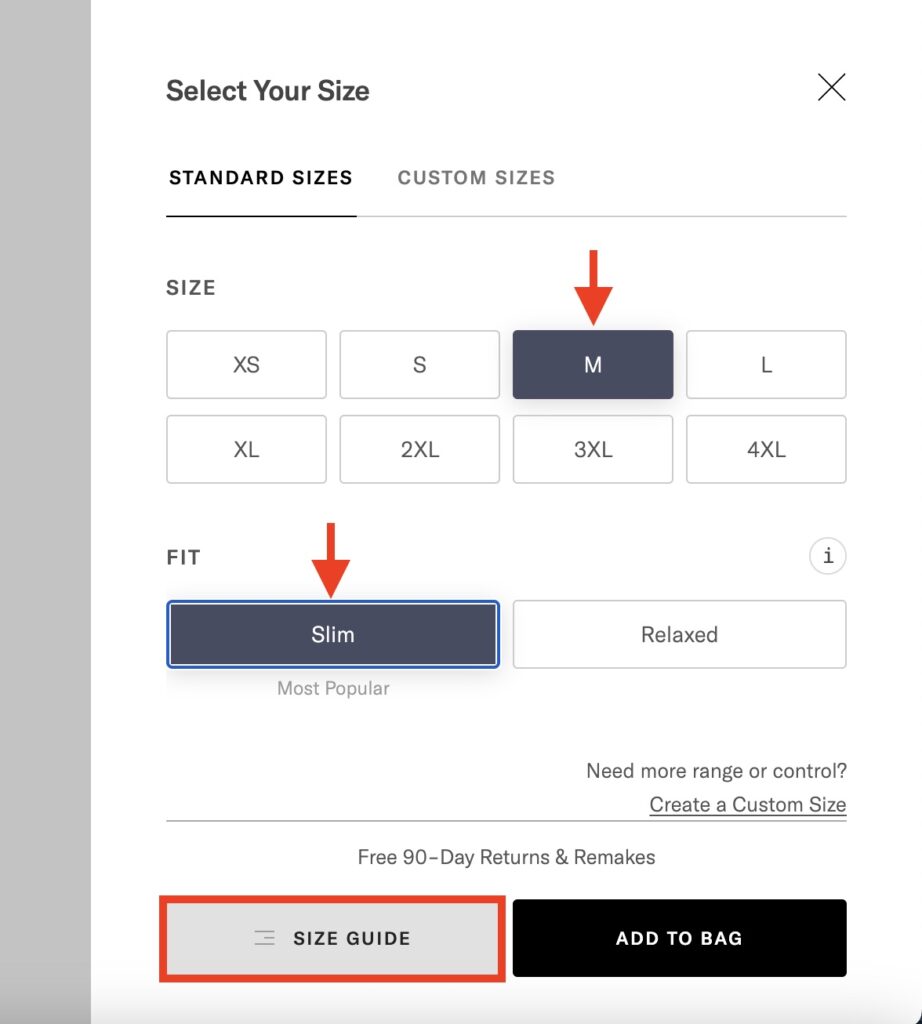
Standard Sizes are another great way to get started with Proper Cloth. For custom dress shirts, the process of choosing your collar and sleeve measurements and desired fit (Super Slim, Slim, Classic) is likely familiar. 

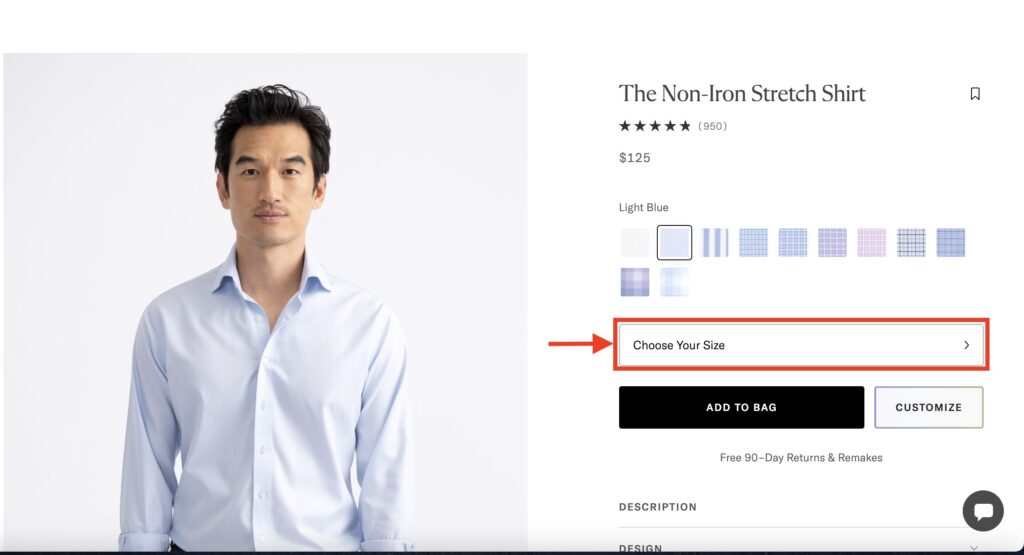
Select "Choose Your Size" on the product page.

Casual Shirts – Choose from Small/Medium/Large Sizing

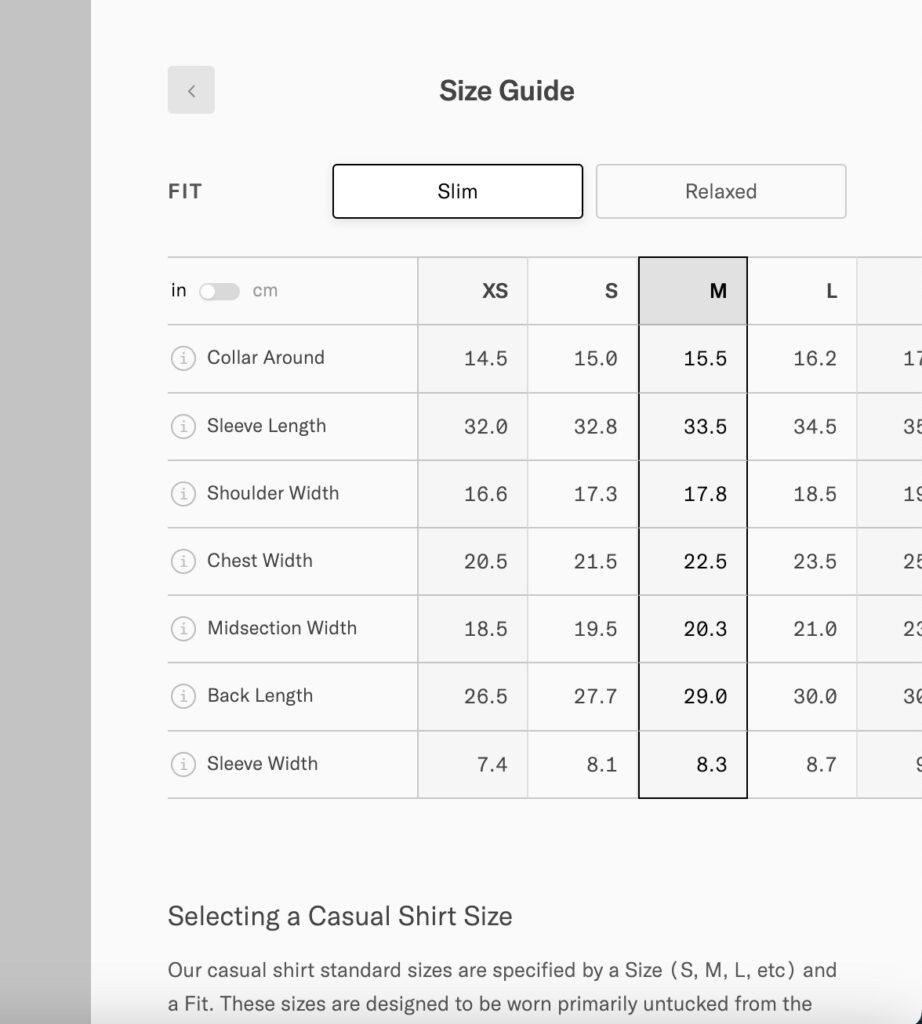
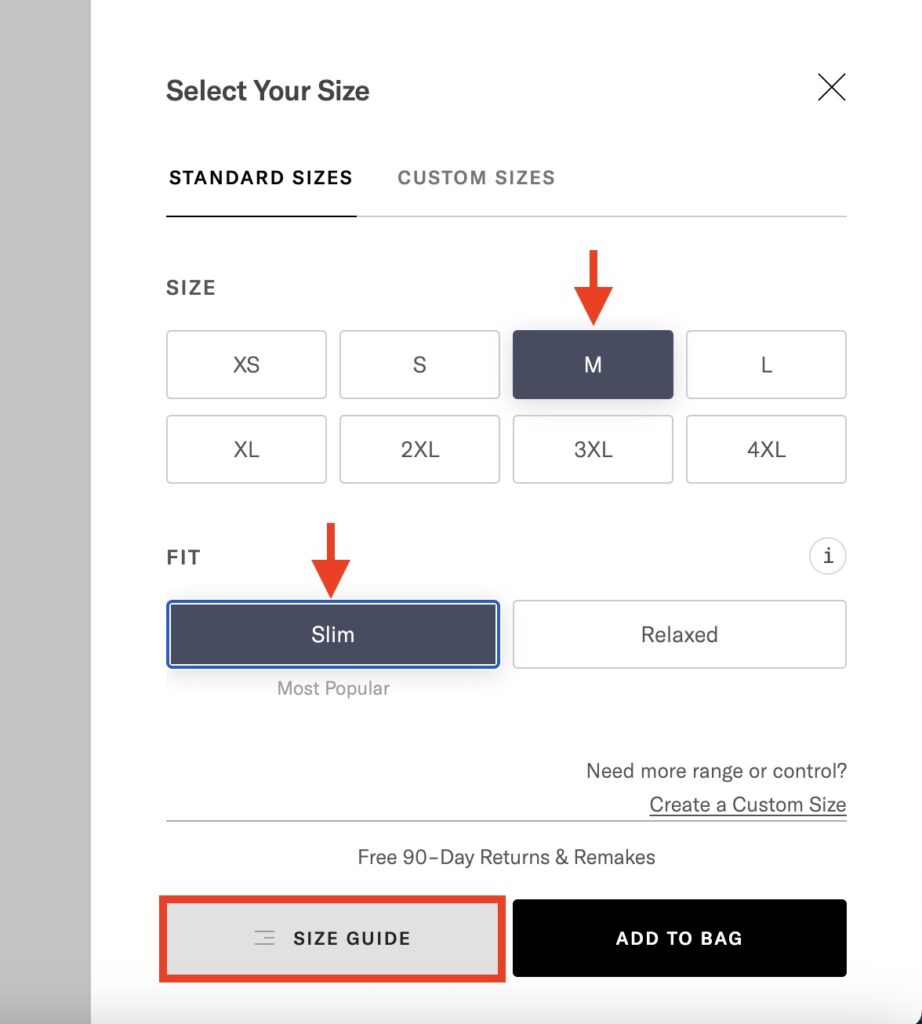
For casual shirt styles, Small/Medium/Large/etc. sizing can be a more familiar method of choosing the right shirt size.

Standard Size options are also available for jacket and pant products

Custom jacket and pants size (US sizing), length and fit are also available.

More information on Slim vs. Super Slim vs. Classic fit for custom shirts.

More information on standard jacket sizes and fit preferences.

The following articles provide more information on the types of standard fit sizes offered for our different custom pant product categories:

How to View A Size Chart

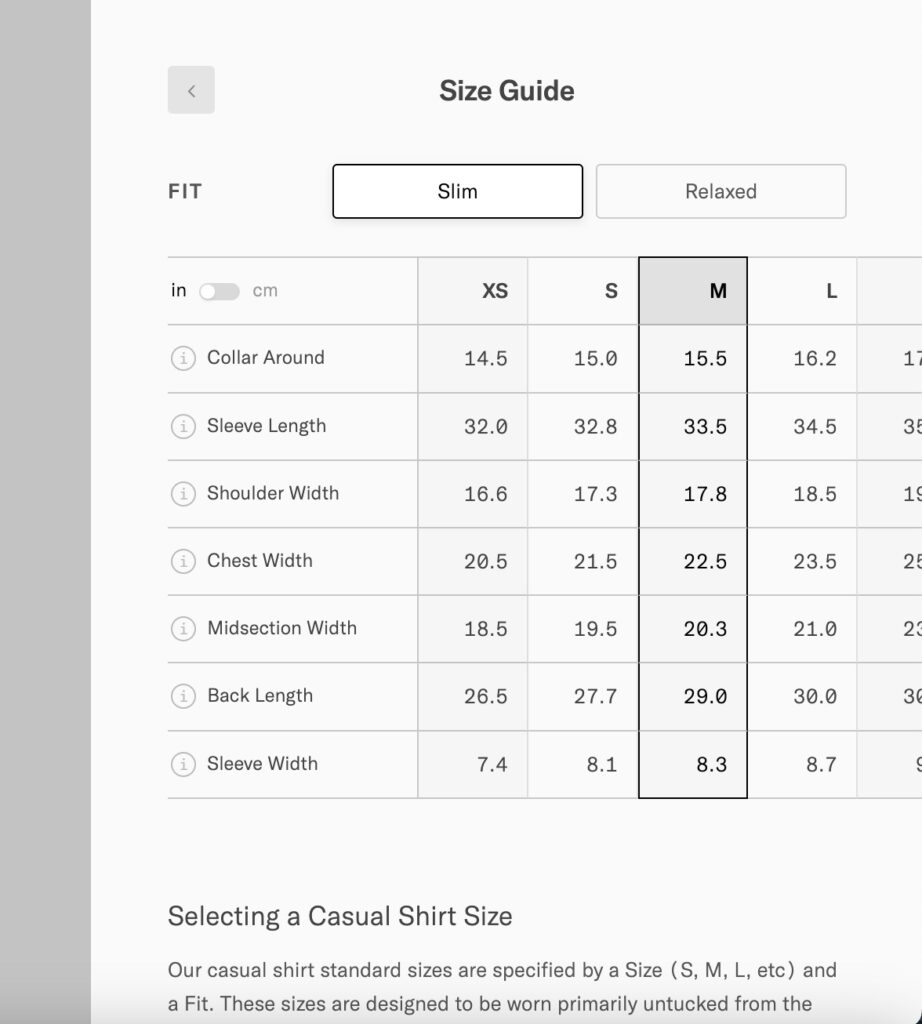
After selecting your standard dimensions, as described above, click Size Guide.

Note: All Proper Cloth dress shirts, jackets, and pants are custom made-to-order. Choosing a standard size for your custom shirt, jacket, or pant order will be subject to standard turnaround times.

Understanding ‘Width’ Dimensions

Body measurements and the dimensions used for your Proper Cloth orders are quite different. For shirts sizes, Chest Width, Midsection Width, Bottom Width, and Sleeve Width are all measured across the front of a shirt laying flat on a surface.

Similarly, for pants, the Waist, Hip, Thigh, Knee, and Bottom Opening Width are all measured across the front of a pant laid flat.

For jacket sizes, the Chest Width, Midsection Width, Hip Width, Bicep Width, and Sleeve Opening Width are measured across a jacket laid flat.

Thus, multiplying the mentioned ‘width’ dimensions by 2 will yield the total circumference of the garment in these areas. For other measurements such as Collar Around, Sleeve Length, Inseam Length, etc. the dimensions are more straightforward.

Managing Your Saved Custom Sizes

Managing Your Sizes

In your Proper Cloth account you can save an unlimited number of custom Shirt, Jacket, and Pant sizes. For shirts this may include your perfect dress shirt size, your untucked casual size, an overshirt size, and a short sleeve size. For pants, you’ll need a size for casual pants, like chinos or 5-pockets, that’s separate from your dress pant size.

Whatever the case may be, you can edit, update, and save new size profiles under the Custom Sizes page of your Proper Cloth account.

View/Edit/Save Your Size Profiles

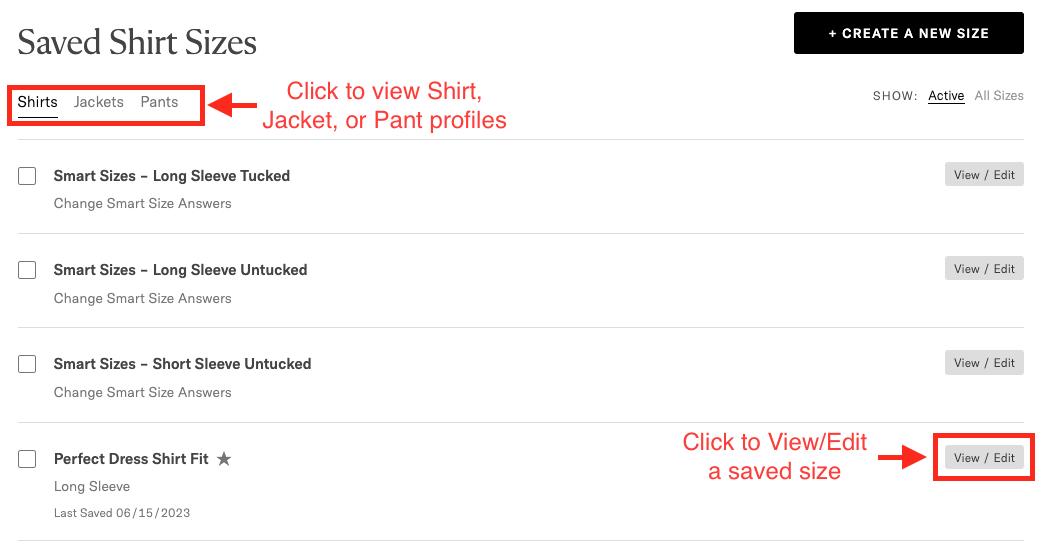
From your Saved Sizes, you can navigate between Shirt, Jacket, and Pant profiles. Let’s say you’re starting with Shirts. From your list of saved size profiles, click View/Edit to pull one up for review, updating, or copying.

view or edit a saved custom size

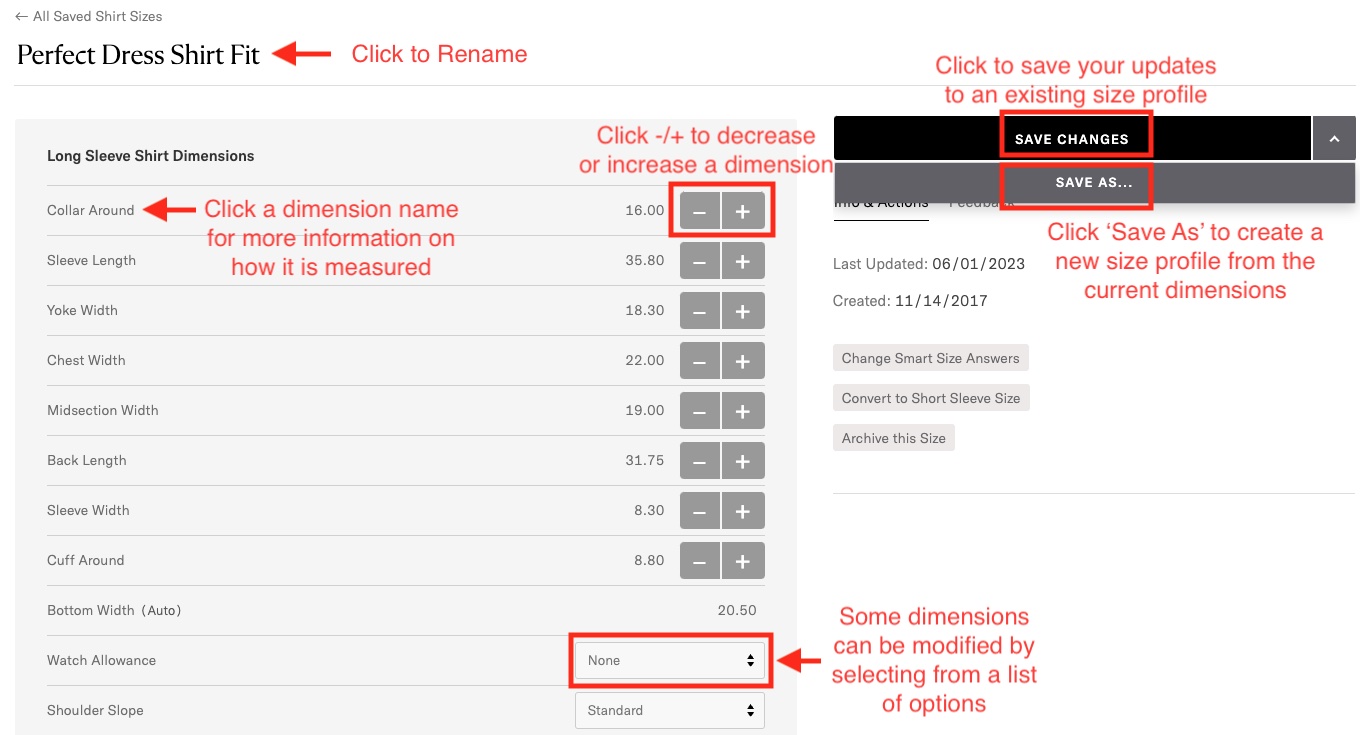
From View/Edit mode, you can take a number of actions:

  • Click the profile’s title to edit or rename it.
  • Click the name of any dimension to view helpful tips about how the measurement works.
  • Click the -/+ buttons to decrease or increase a particular dimension.
  • For some dimensions, a modification can be made by picking from a list of options.
  • When you’re done reviewing or editing your size profile, click Save Changes to save your edits.
  • If you wish to create another size profile based on the one you’re currently viewing/editing, click the arrow next to Save Changes to ‘Save As’ a new profile. You’ll be prompted to name your new profile.

Archive or Set a Default Size

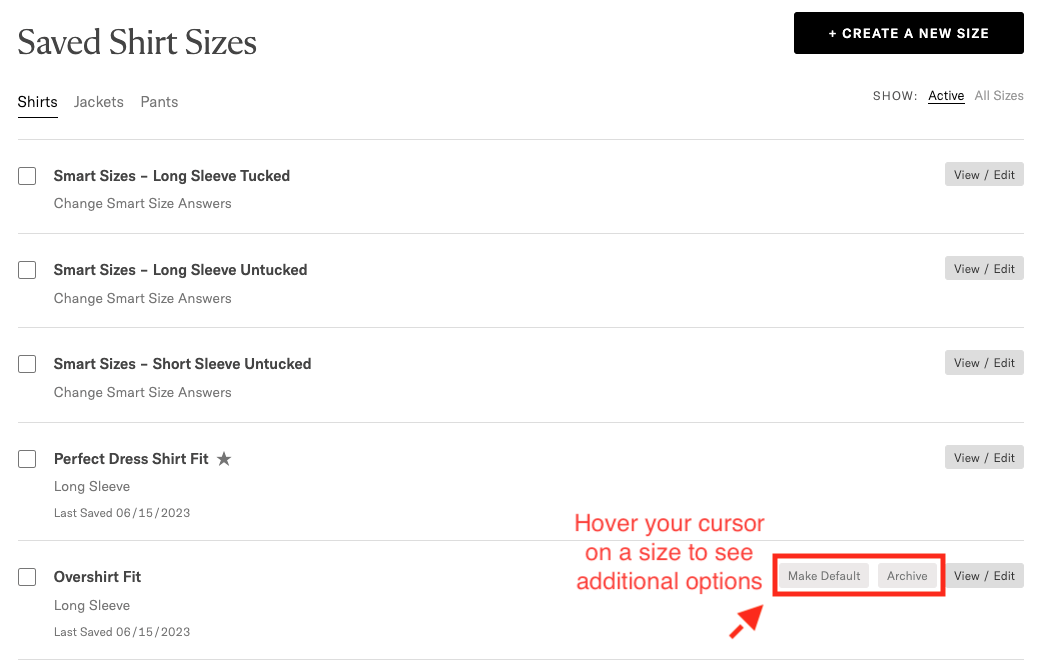
To archive (hide) a size you no longer wish to see as an option when ordering new custom garments:

  • Hover your cursor over the saved size you wish to archive
  • The Archive button will appear
  • Click ‘Archive’

To set a particular size as the default size selected when ordering a new custom garment:

  • Hover your cursor over the saved size you wish to set as the default
  • The Make Default button will appear
  • Click ‘Make Default’

archive or set a default size

Note: A star next to a size indicates that that size is currently set as the default.

View and Activate Archived Sizes

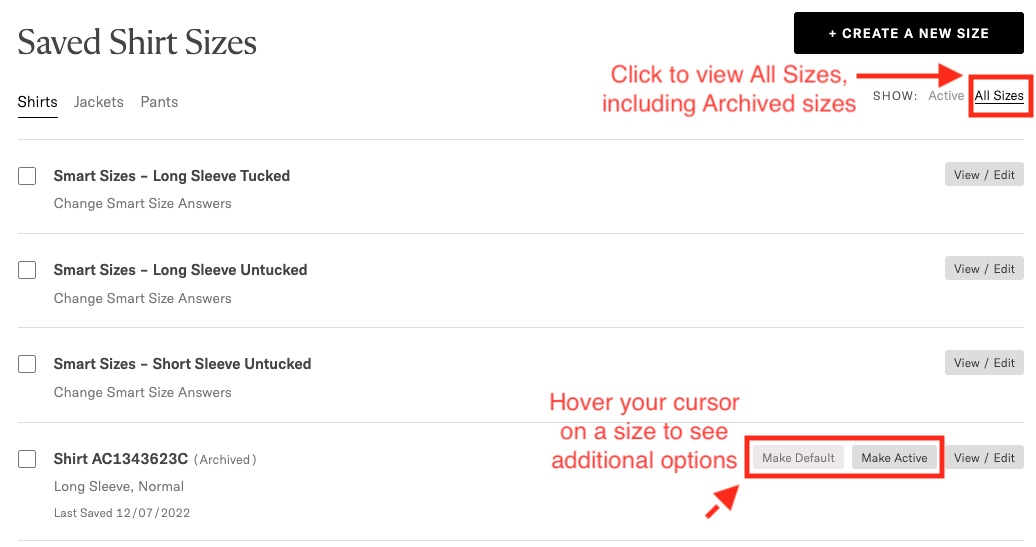
To view archived sizes, simply click ‘All Sizes’ in the top right corner next to ‘Show’. Similar to archiving a size, you can make an archived size active again by hovering your cursor over a particular size profile and clicking ‘Make Active’ next to the View/Edit button.

view or activate archived sizes

Note: Every time you place an order with Proper Cloth, we create an archived size named with each particular order number and item letter.

Comparing Selected Sizes

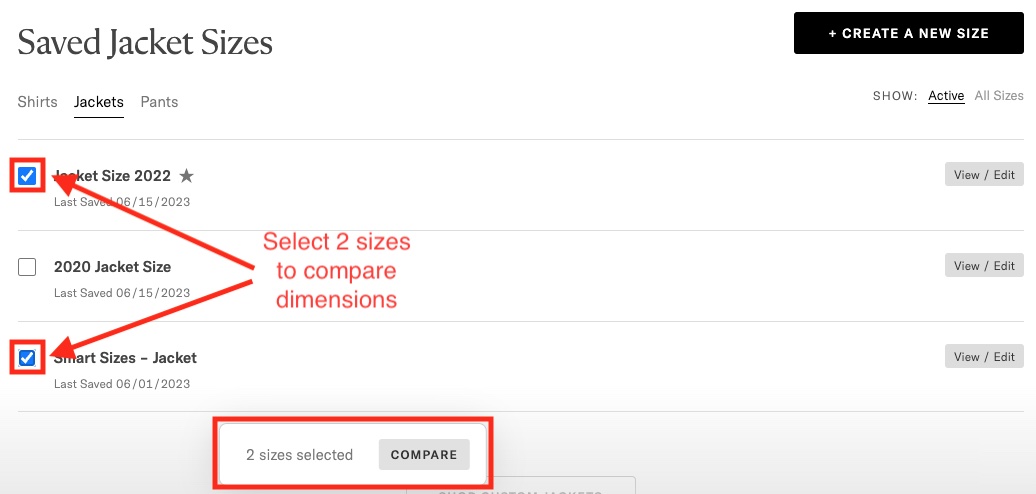
To compare two sizes, simply check the box to the left of each size and click the Compare button below.

select 2 sizes to compare dimensions

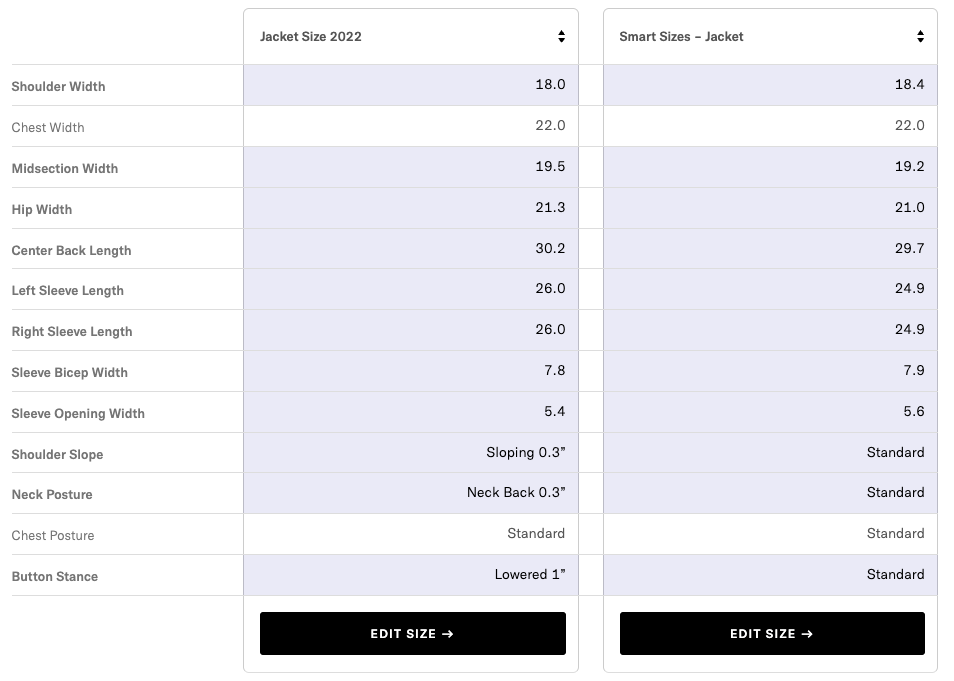
In the comparison view, dimensions that are different will be highlighted in grey.

comparing dimensions of two saved sizes

How to Measure Pants: Dress Trousers and Casual

Measuring Pants

Getting a good measurement will help you create a perfect size. When you measure pants, having a flat, open space is helpful – a second pair of hands also isn’t a terrible idea, but it can be done solo.

Measure Pant Waist Width

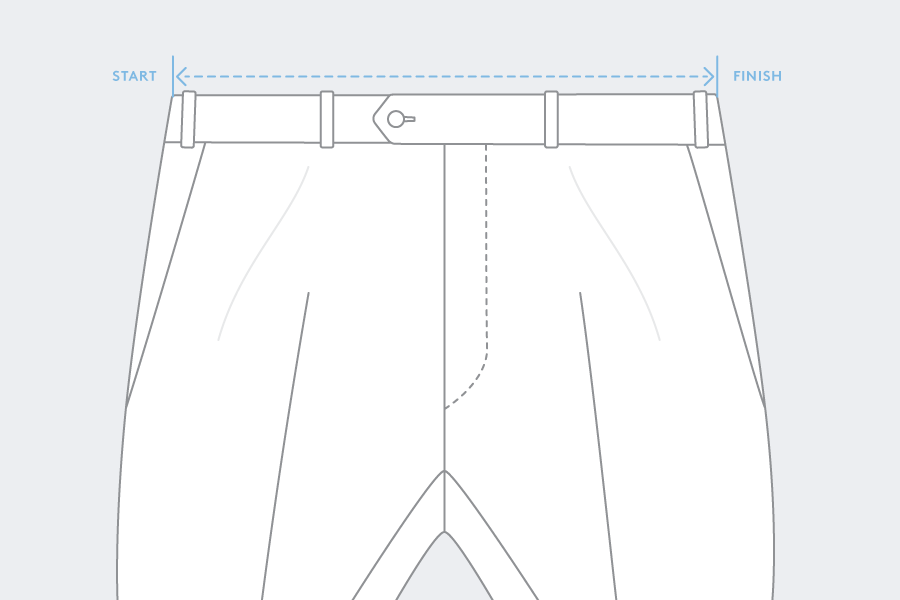
Lay the pants down on a flat surface, face up. Use your hands to spread the pants out flat, with the waistband buttoned at the front and the fly zipped close. The front of the waistband should lay directly on top of the back of the waistband. Measure across the top of the waistband from one side of the pant to the other.

Measuring Waist Width


Measuring Pant Hip Width

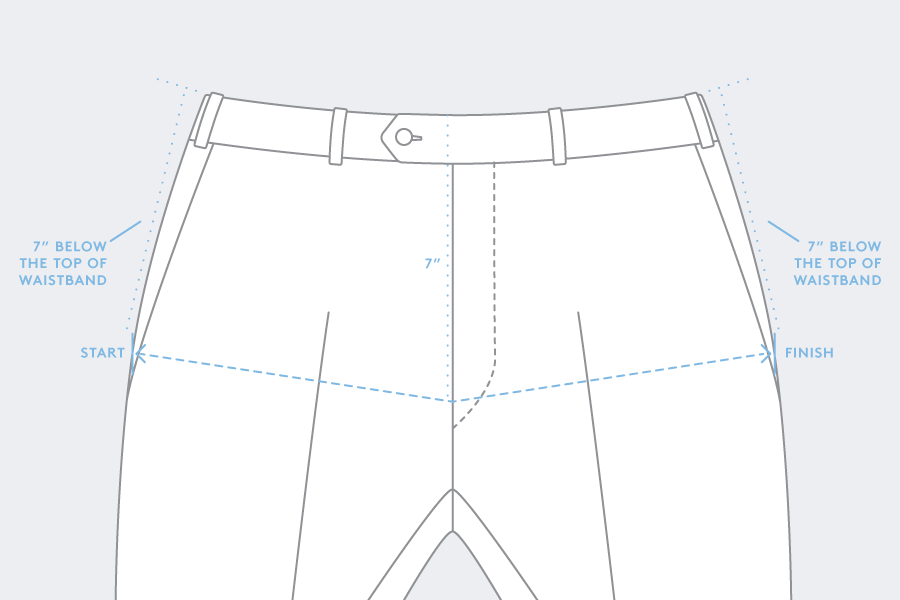
With the pants you’re measuring laying face up on a flat surface, use your hands to spread the pants out flat, with the waistband buttoned at the front and fly zipped close. Starting 7” below the top of the waistband, measure parallel to the top of the waistband across from one side of the pant to the other.

Measuring Hips Width

Measuring Pant Thigh Width

Lay the pants flat on their sides, so that the legs are folded along the front and back creases. Fold the top leg up over the waistband, making the bottom of the crotch visible. Use your hands to spread out and flatten the bottom pant leg across the thigh. Measuring 1” below the lowest part of the crotch (where the inseams of each leg meet), measure straight across the width of the leg, perpendicular to the inseam.

Measure Pant Knee Width

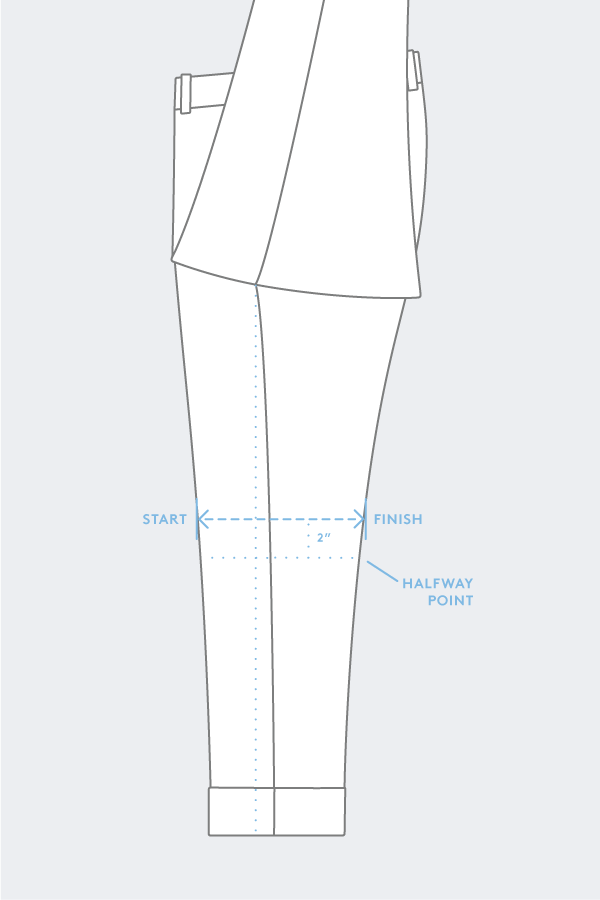
Lay the pants flat on their sides, so that the legs are folded along the front and back creases. Fold the top leg up over the waistband, making the bottom of the crotch visible. Use your hands to spread out and flatten the bottom pant leg. The knee width should be measured 2” above the halfway point of the inseam. At this point, measure straight across the width of the leg, perpendicular to the inseam.

For example, if the inseam length is 32”, the Knee Width should be measured at 14” below the bottom of the crotch. That is, 2” above the midpoint (16”) of the total 32” inseam. 

Measure Pant Leg Opening Width

Lay the pants flat on their sides, so that the legs are folded along the front and back creases. Fold the top leg up over the waistband, making the bottom of the crotch visible. Use your hands to spread out and flatten the lower end of the bottom pant leg. Measure across the bottom of the pant hem, from one edge of the leg opening to the other.

Measuring Leg Opening Width

Measure Pant Front Rise

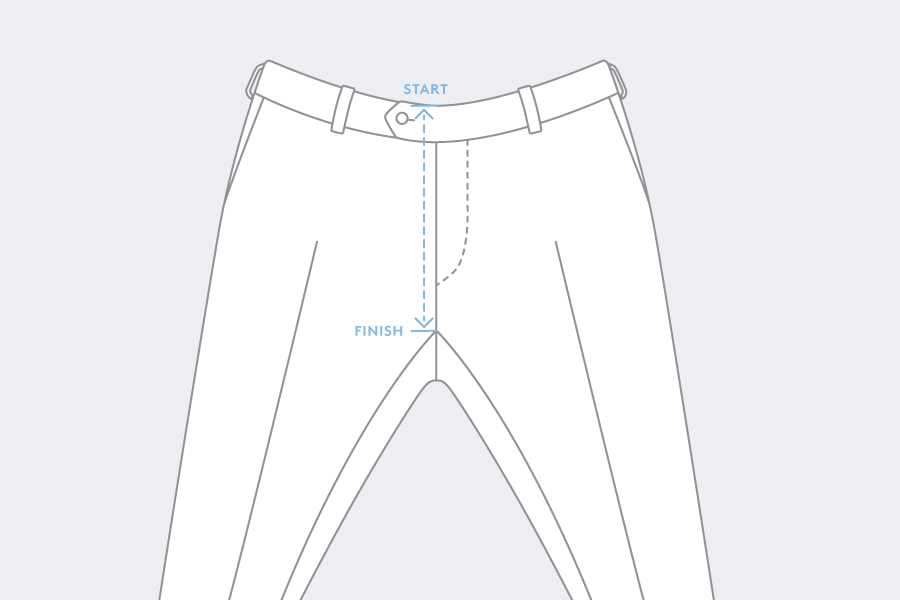
With the pants laying face up on a flat surface, use your hands to spread the pants out flat, with the waistband buttoned at the front and fly zipped close. Spread the legs further apart from one another than their resting position, such that the bottom of the crotch is clearly visible. Measure from the top of the waistband down along the fly to where the inseams of the legs meet one another.

Back Rise

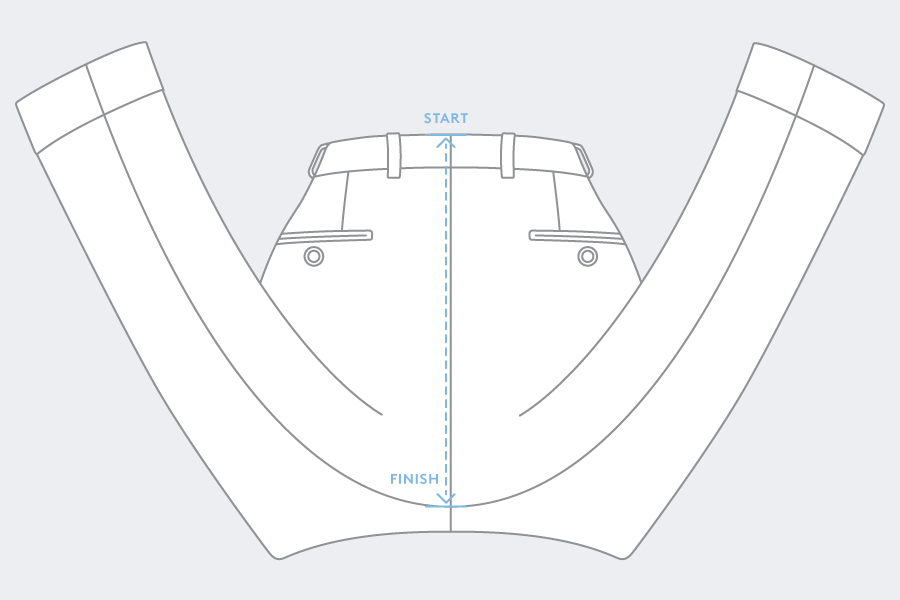
With the pants lying flat, face down, spread the legs further apart from one another than their resting position. Then, fold the legs upward so that the leg openings rest above the waistband. Pull down on the bottom of the crotch until the intersection of the inseams is visible. Measure from the top of the waistband down along the center back seam to where the inseams of the legs meet one another.

Measuring Back Rise

Inseam Length

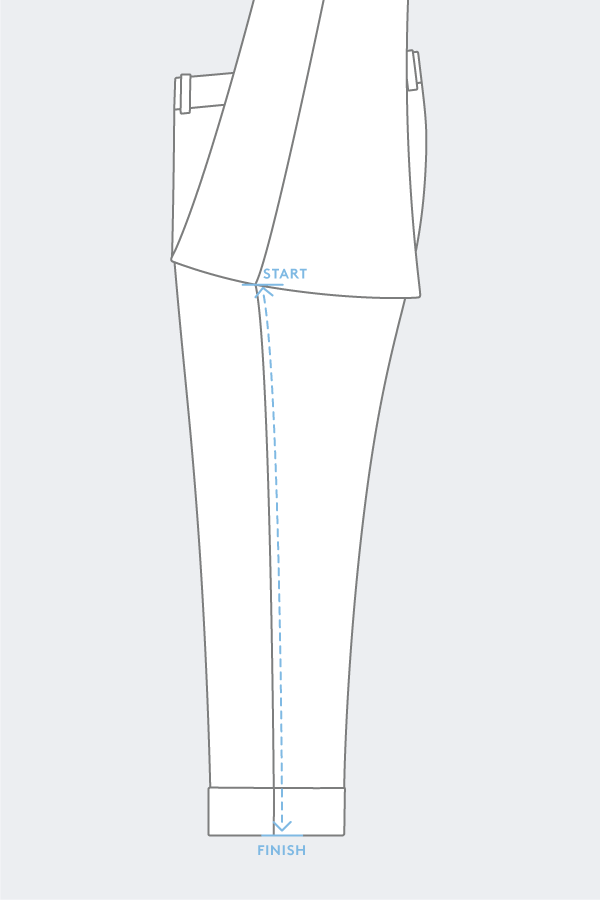
Lay the pants flat on their sides, so that the legs are folded along the front and back creases. Fold the top leg up over the waistband, making the bottom of the crotch visible. Use your hands to straighten out and flatten the bottom pant leg. The inseam length is measured from the bottom of the crotch (where the inseams meet), down the inside of the leg to the bottom of the leg opening.

Total Length

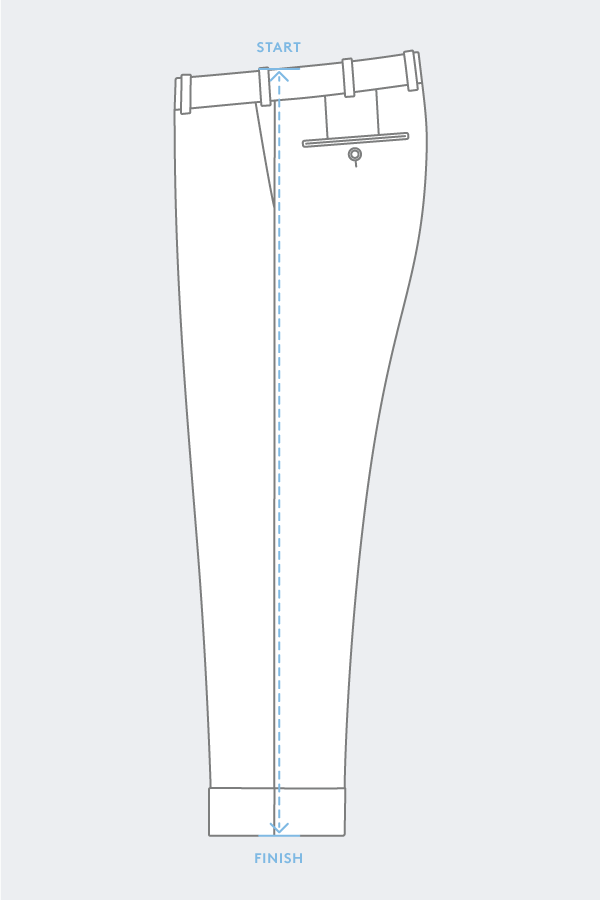
Lay the pants flat on their sides, so that the legs are folded along the front and back creases. Use your hands to straighten out and flatten the pant legs. Measure from the top of the waistband down to the bottom of the leg opening, following along the side seam of the leg.

Measuring Pants Total Length

If you’re having trouble, you can always get in touch with customer service. If you’re feeling confident and ready to measure a jacket, you can find that info here. For more videos on measurements, check out Proper Cloth’s YouTube channel.

How to Choose a Proper Cloth Jacket Size

How to choose a suit jacket size

How to Choose Your Jacket Size

If you’re used to buying a men’s suit or sport coat from a US retailer, you’ll know that your suit jacket size should roughly translate to your chest circumference as measured in inches. For a slimmer fit, choose a jacket size ~1″ smaller than your (body measurement) chest circumference. For a more relaxed, classic fit, choose the jacket size closest to your actual measured chest circumference.

If you’re not familiar with tailored jacket sizes, use the guide below as a reference:

– If your t-shirt size = S, choose jacket size = 36

– If your t-shirt size = M, choose jacket size = 38

– If your t-shirt size = L, choose jacket size = 42

– If your t-shirt size = XL, choose jacket size = 44

Types of Jacket Fit – Slim and Classic

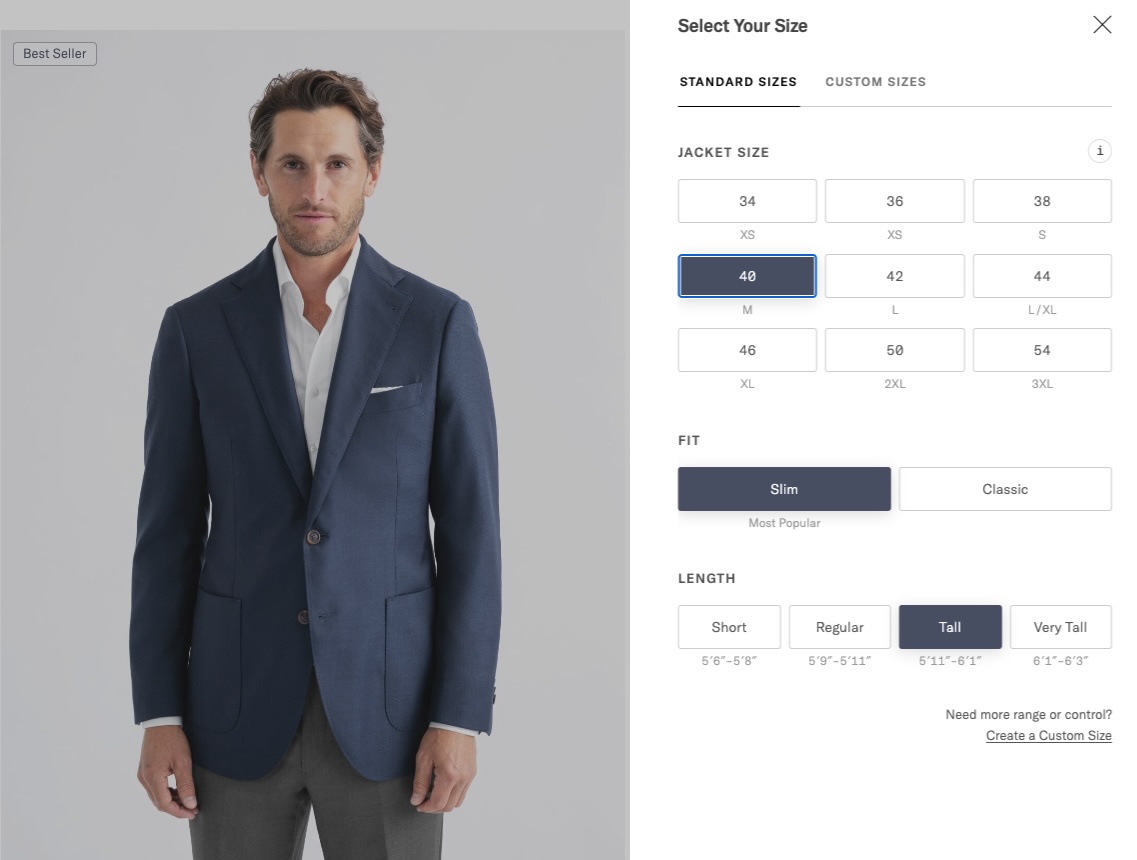
Slim is our most popular fit, intended to fit close to the body without being restrictive. The jacket length is slightly cropped in line with modern sensibilities.

Classic is a more traditionally-minded fit that starts with a broader chest and features more room across all measurements than our Slim fit to achieve more drape and comfort. It also features a longer back length for a timeless appeal. A great choice for those with broader builds.

40 regular slim fit                 classic fit
Shoulder Width 18.3″ 18.8″
Chest Width 22.0″ 22.8″
Midsection Width 19.2″ 19.9″
Hip Width 20.6″ 20.8″
Center Back Length 29.3″ 29.8″
Left Sleeve Length 24.4″ 24.4″
Right Sleeve Length 24.4″ 24.4″
Sleeve Bicep Width 7.9″ 8.1″
Sleeve Opening Width 5.5″ 5.7″


Jacket and Sleeve Length – Regular, Short, Tall, and Very Tall

Tailored jackets can be ordered in ‘Short’, ‘Regular’, ‘Tall’, and ‘Very Tall’ sizes to accommodate men of all different heights.

  • Short jackets measure 1.2″ shorter in the sleeve length and center back length than Regular
  • Tall jackets measure 1.2″ longer in the sleeve length and body length than Regular
  • Very Tall jackets measure 2.0″ longer in the sleeve length and body length than Regular

Use the ‘Size Guide’ button on any suit or jacket product page for assistance choosing the right jacket length option, based on your height.

Click Size Guide for help choosing the correct jacket length.

Home Try-On for Jackets

Home Try-On is a program that Proper Cloth offers specifically to help customers create custom jacket, pant, and shirt sizes. This program allows you to try on two standard-size garments and discuss how they fit with one of our fit specialists. Home Try-On is currently available for customers in the United States and Canada only, not including Hawaii, Alaska, Puerto Rico, and Guam.

Ordering Fabric Samples

How to order shirt fabric samples from Proper Cloth

We try our best to make our shirt fabric photographs and descriptions communicate the true essence of a fabric, but sometimes you just have to see the fabric in person to really know what it’s like. With that in mind, we’ve made it easy to request samples of any shirt fabric.

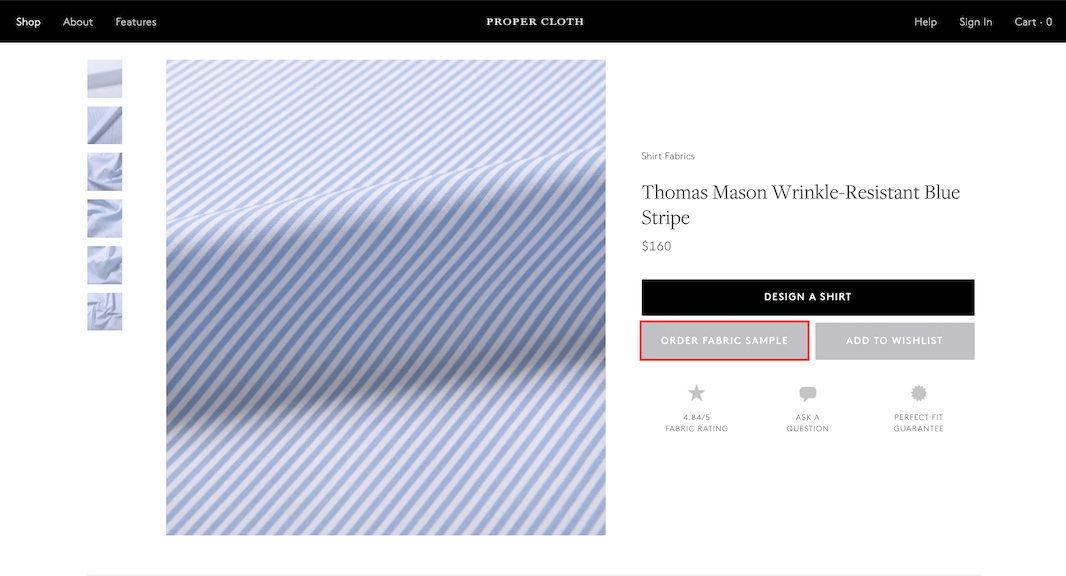
Just browse through our fabrics, click on the fabric you like and then click “ORDER FABRIC SAMPLE” to add it to your bag.

Click 'Order Fabric Sample' button of the desired fabric to add sample to cart.

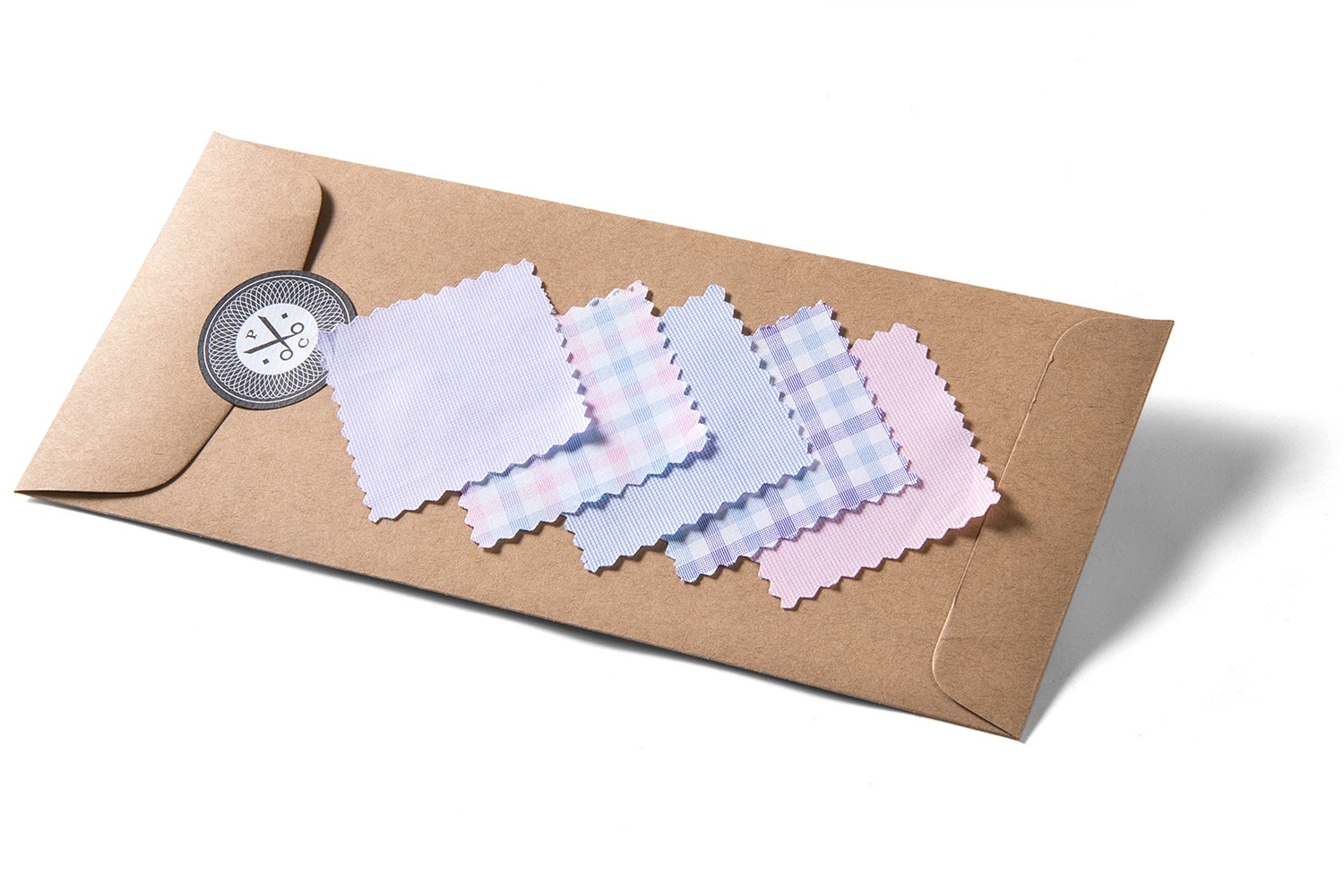
The charge for fabric samples is $1 each, and the site will allow you to order up to six at one time. Note that we will credit your account $1 for every fabric sample you purchase. If you want to order more than six fabric samples at one time, you’ll have to complete your checkout more than once.

Fabric samples are 2″ x 3″ in size and will be sent from our headquarters in New York via US Postal Service, so you can expect delivery to US addresses typically within a week. For international delivery, the speed can vary a bit more.Proper Cloth fabric sample package.

Samples are not available for all shirt fabrics

Fabric samples can take a few weeks to be produced and shipped to our headquarters from our production facility. For this reason, samples may not be available until a few weeks after new fabrics are added to the site.

Further, certain limited edition fabric types or those with complicated finishing processes (washed indigo, garment dyed, enzyme washed, etc) may not be available for fabric samples.

Samples are not available for pant and jacket fabrics

Currently, fabric samples are not available for our custom pant and jacket products.

Custom Shirt Design Options

Collars

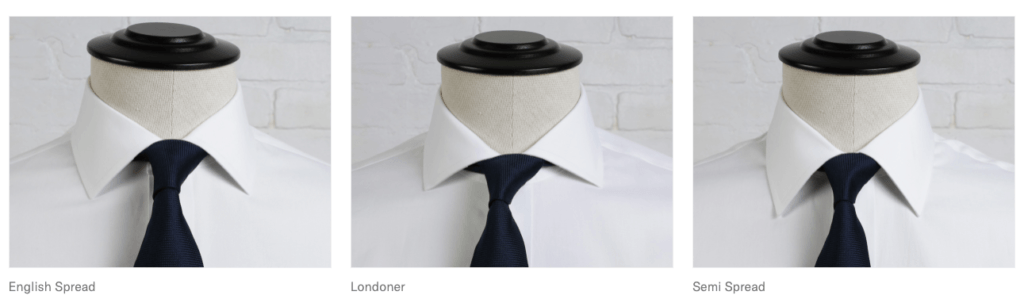
Proper Cloth offers over 30 collar style options. We offer business and casual styles in stiff, fused, or casual, unfused construction styles.

Custom Shirt Collar styles and descriptions

Cuffs

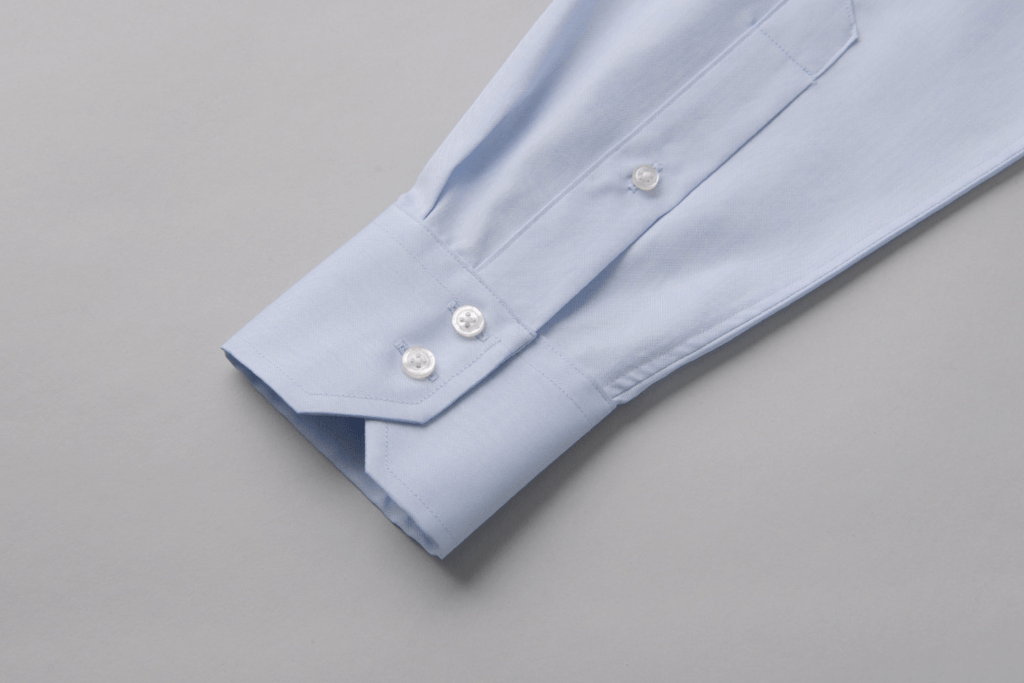
We offer many custom shirt options–several classic long sleeve cuffs and a few short sleeve cuff designs as well. Cuff styles vary from formal to business to casual with fused or unfused construction styles.

Custom Shirt Cuff styles and descriptions

Front / Placket Options

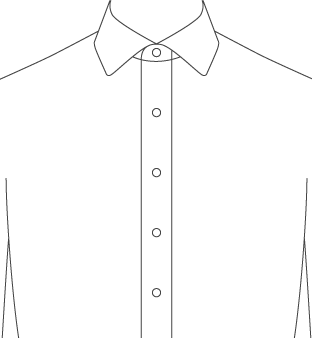
We offer several ways to design the front of your shirt–with or without a placket, extra stiff “stand up placket” options for perfect unbuttoned looks, soft/unfused options for classic casual shirts, formalwear designs that allow for tuxedo studs, etc.

Custom Shirt front placket styles and descriptions

Pockets

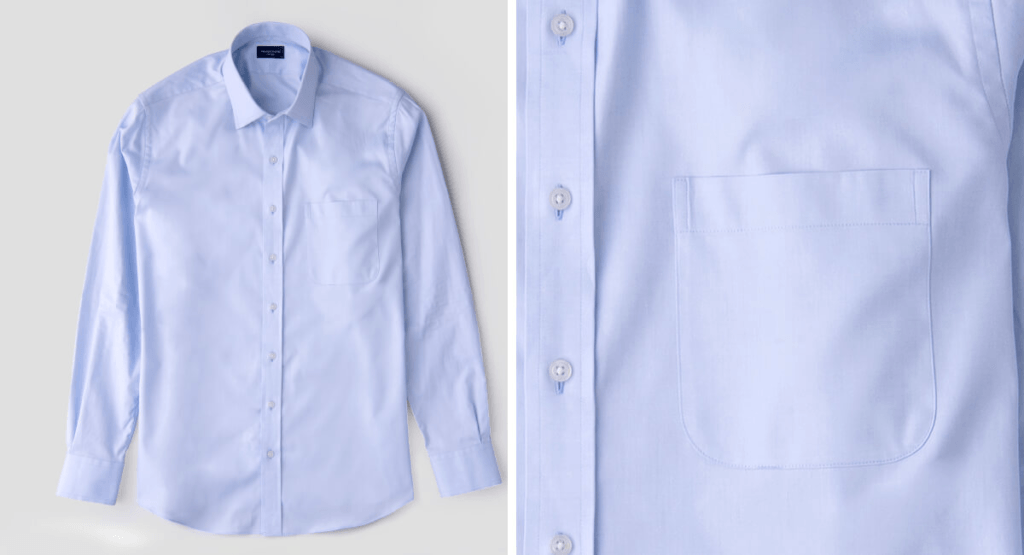
Proper Cloth has a range of pocket styles to choose from for both business and casual looks. All pockets are placed such that the inside edge of the pocket is 2 1/8″ from the center of the shirt.

Custom Shirt pocket styles and descriptions

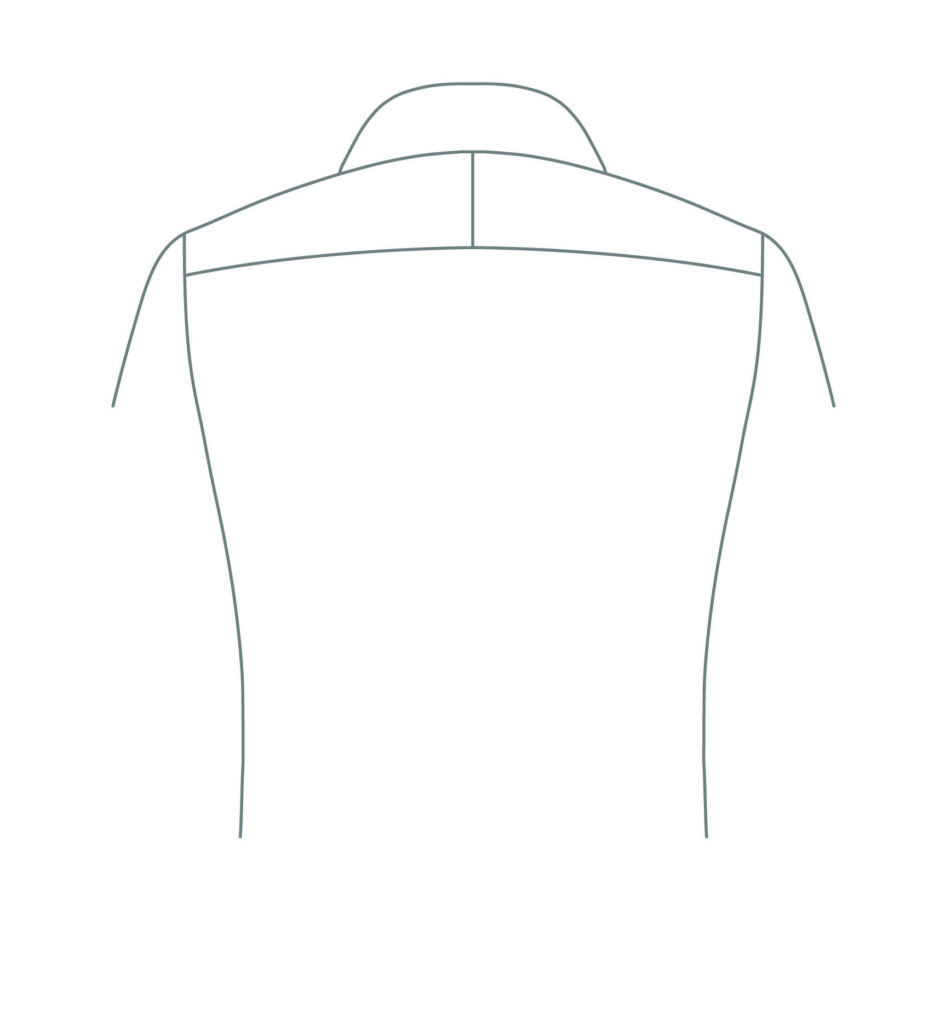
Yoke Options

We offer finely tailored ‘split yoke’ and one-piece yoke construction, in addition to casual Western-shirt style yokes.

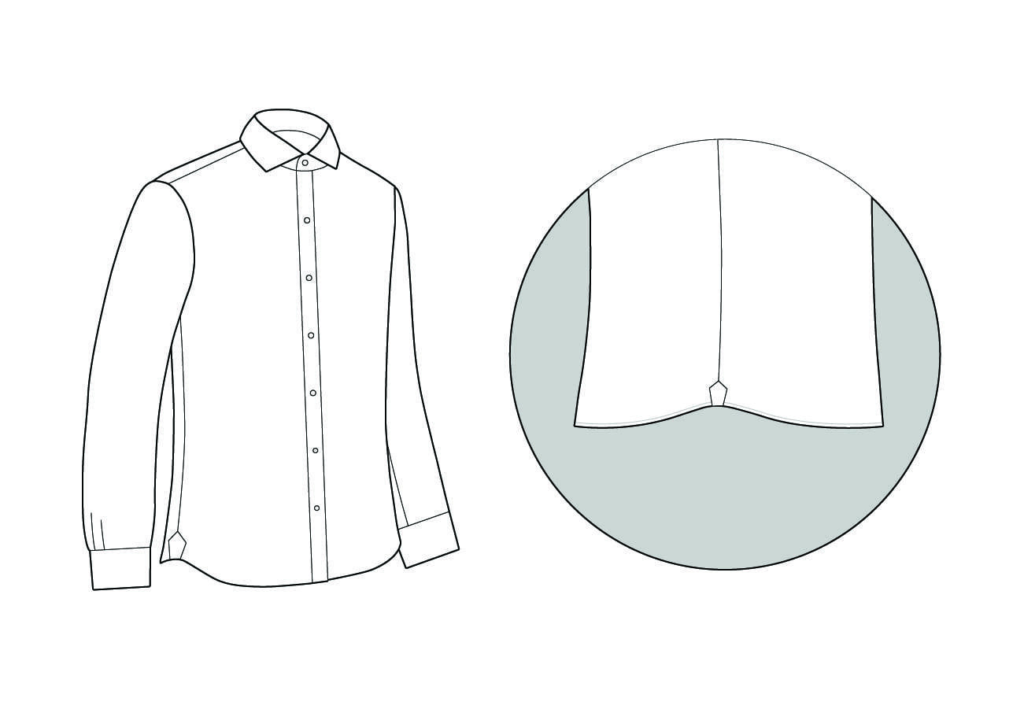
Bottom Hem Styles

The shirt hem, often defined by its shape, is the bottom end of the shirt, which is folded and hemmed to create a finished edge on the garment. Proper Cloth has three types of hem to choose from for both business and casual shirts.

Custom Shirt bottom hem styles and descriptions

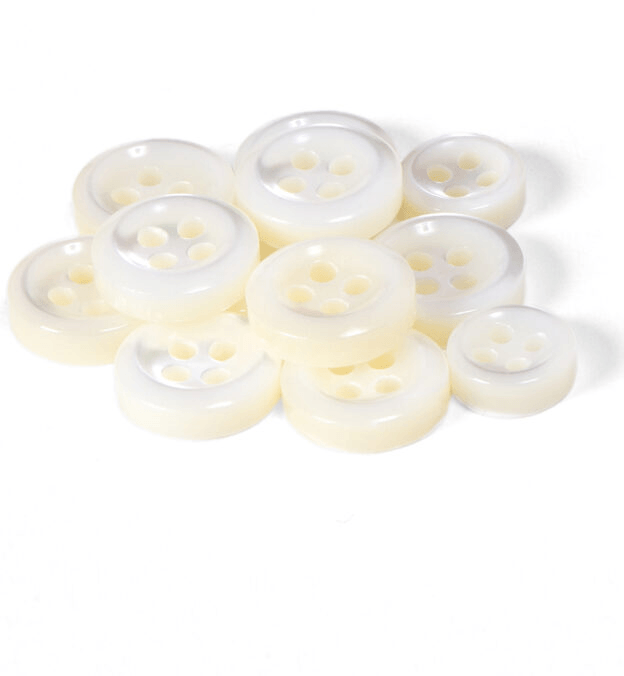
Buttons

We offer a wide variety of custom shirts buttons ranging from durable plastic to faux horn to luxurious Mother of Pearl options.

Custom Shirt button options and descriptions

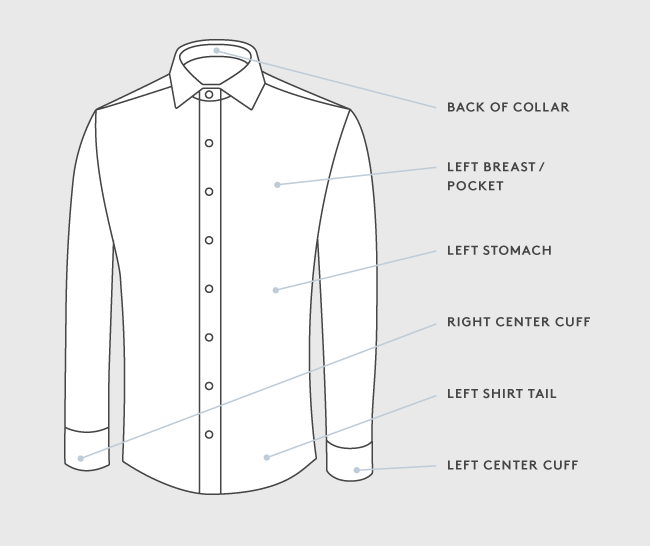
Monograms

A monogram is a great way to personalize your custom dress shirt. Add your initials—or a special date or nickname—in a bold or complimentary color to emphasize your style and set your shirt apart. We offer a variety of monogram styles, up to five characters, that can be applied to your custom shirts in 6 different locations.

Custom Shirt monogram styles and descriptions

How to Update and Share Your Favorites

Favorites is a place to save your favorite Proper Cloth custom and stocked products for future reference.

How to Update Your Favorites

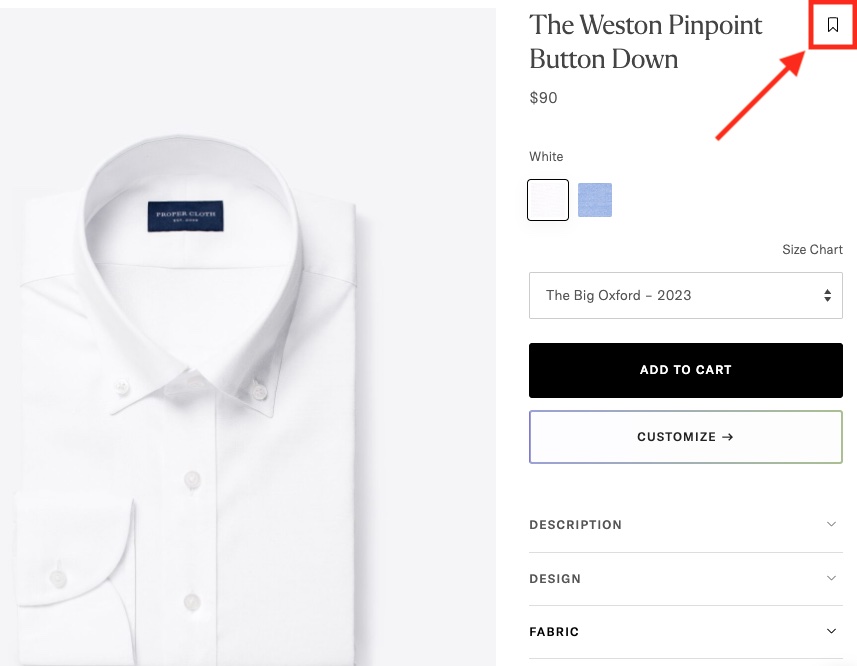
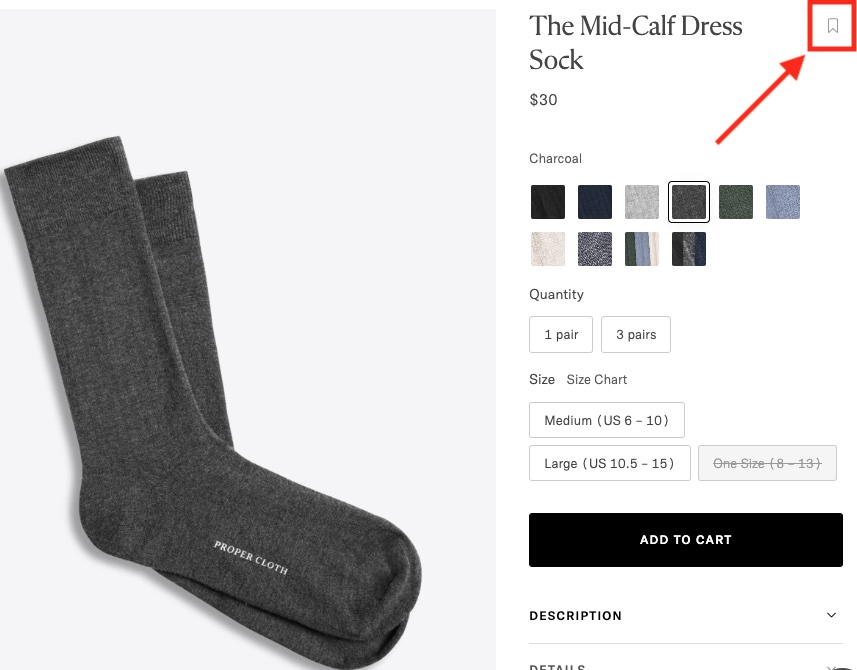
On every product page, next to the product name is a bookmark icon. Click the icon to add the item to your Favorites.

For custom products, choose your preferred Size Profile and then click the bookmark icon to add the item to your Favorites.

Bookmark icon at the right of product name.

For stocked products and accessories, choose your size and style and then click the bookmark icon to add the item to your Favorites.

Bookmark icon at the right of product name.

How to Share Your Favorites

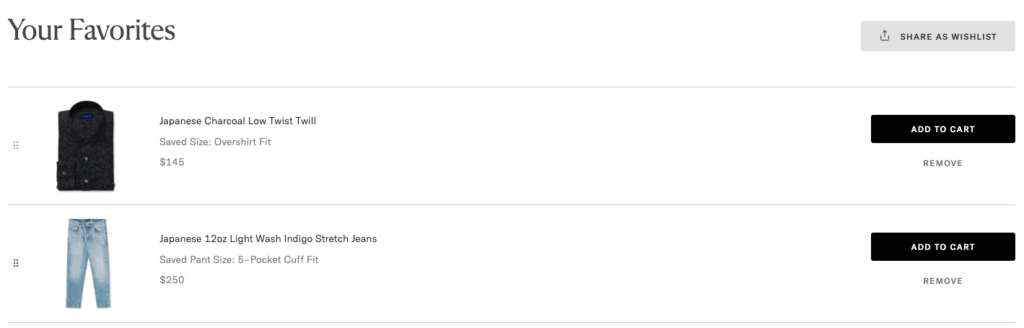
On the top, righthand corner of your Favorites, click the ‘Share As Wishlist’ button.

Click 'Share As Wishlist' button to share wishlist.

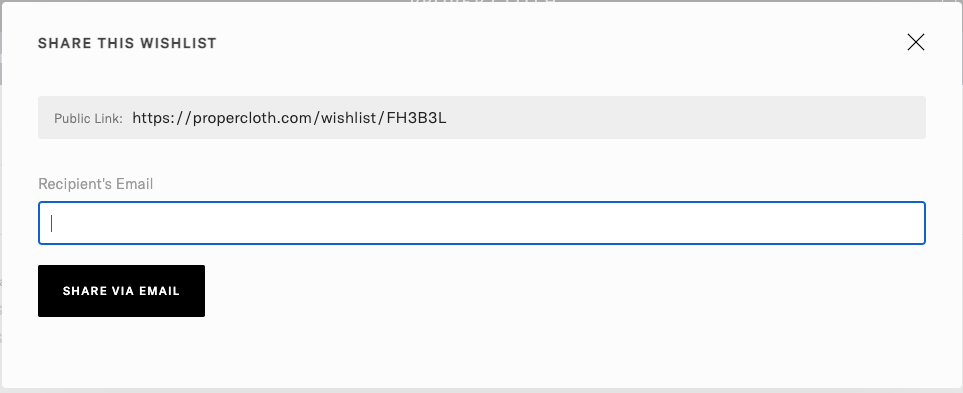
From there, you can enter an email address to send your Favorites to someone via email. Alternatively, you can copy the ‘Public Link’ and share that with someone, too.

Enter recipient's email address then click 'Share via Email'.

When they visit the link from the email (or shared with them by other means) the recipient will see all of the items in your Favorites and their associated (custom) size. They can then add the item to their bag with your custom/preferred size as specified!

Care Instructions – All Product Types

Featured

Custom Shirts – See Label

At Proper Cloth, we offer a wide range of shirt styles, and depending on the type of fabric used for the shirt, the care instructions will be different. Washing your shirt according to the suggested care instructions will help ensure that the shirt lasts a long time and will look its best. 

Custom Shirt care instructions by material type.

Casual Pants – Wash Cold, Air Dry

Proper Cloth’s casual pants are garment washed during production for a softer and more relaxed feel and to minimize potential shrinkage over time. As with denim, we recommend washing them every few wears—not quite as often as you wash your shirts. Launder them at home with cold water and like colors on your washing machine’s delicate or hand-wash setting, and then hang them to dry. 

Casual Pant care instructions.

Tailored Clothing – Dry Clean Sparingly

Dry cleaning is the recommended cleaning method for tailored clothing (jackets, dress trousers, suits, and tuxedos), though it should be done as infrequently as possible—after several wears or once per season, not after each wear. Garments cleaned less frequently will last longer than garments cleaned more frequently.

Tailored Clothing care instructions.

Sweaters & Knitwear – Hand Wash or Dry Clean

Proper Cloth offers sweaters in a variety of styles and materials. For almost all materials and blends a careful hand wash in cold water is best. After washing, lay the sweater down on a dry towel on a flat, waterproof surface. You may need to reshape the sweater a bit. Don’t stretch it beyond its original size to avoid damage. Once the sweater is shaped to its original size, leave it to air dry.

Note: Specific care instructions should also be included on the tag sewn inside your Proper Cloth sweater. For cashmere and cashmere blend knits, dry cleaning is another option.

Essentials – Machine Wash, Tumble Dry Low

Proper Cloth Essentials, including socks, underwear, and t-shirts are machine washable. Washing similar colors in cold water is recommended to prevent fading or transfer or dye between garments. Tumble dry on a low heat setting or air dry.

Note: Specific care instructions will also be included on the tag sewn inside your Proper Cloth essential or in the original packaging.

Outerwear – Dry Clean Sparingly

Similar to Tailored Clothing, all outerwear items should be dry cleaned only. For outerwear, typically dry cleaning should be done as infrequently as possible or in the event of a stain.

Advanced Tips for the Perfect Trouser Fit

When it comes to the fit of your custom dress pants, the solutions to some common issues are tough to identify. Here’s what our experts say you should keep in mind when you’re modifying the fit of your trousers.

Dress Trousers That Fit Well

1. Waist Width

The fit around your waist can make or break the overall fit of your trousers. When creating your first custom dress pant size on our site, we recommend selecting a base size with the waist measurement you would select at any retail store.* The waist should fit just above the hip bones, and be both loose enough to allow 2-4 fingers to fit inside the waistband and tight enough to sit in place without a belt.

*Vanity sizing typically amounts to a 0.5″-1.0” difference between an item’s labeled size and the item’s actual measurements. If you typically purchase pants with a 34” waist from an American retail store, the pants will likely measure between 35” and 36” around the waist.

2. Hip Width

The Hip Width, more commonly known as the seat, fits well if the fabric drapes cleanly over the hips without interruption between the waist and the thigh. Tension lines around the fly or the pockets popping open are indicators that the Hip Width is too tight and may require that you choose a new base size. The Waist Width will also likely need adjusting if the Hip Width is changing, so make sure to check the fit of that dimension as well.

3. Bottom Opening Width

The fit of the bottom opening width can largely depend on the overall fit of the pants legs. There should be enough room around the bottom opening width to allow the fabric to drape cleanly over the legs while sitting, standing and walking. If you find that the lower leg catches on the calves when seated and does not return to full length when standing up, then the bottom opening width is too tight. 

Your personal style and body type will influence the taper of your pant legs, and therefore the measurements that govern it—Thigh Width, Leg Opening Width, and Knee Width. These are some of the easier dimensions to alter. Keep in mind that your pants should be comfortable when you’re standing, sitting, and walking. If the fabric of the lower pant leg catches on your calves when you’re seated and does not return to full length when you stand, the Knee Width and Leg Opening Width are likely both too tight. The Thigh Width, Leg Opening Width, and Knee Width can each be taken out by 0.25” (0.5” in circumference) and taken in by 1” (2” in circumference).

4. Inseam Length

The length of your trousers is controlled by the inseam. Like many of our customizable dimensions, the inseam length is dependent on your personal preference and style. It is important to consider what type of pant break you would like when adjusting your inseam length.

5. Front & Back Rise

Once again, your personal preference and style comes into play here. The front and back rise of your trousers should match your desired fit without any tightness or discomfort in the seat. A more classic fit has a higher rise that allows the waistband to sit above the hip bones. Conversely, a modern fit requires a lower rise, with the waistband sitting just below the hip bones. We recommend going with a medium rise, where the waistband sits atop the hip bones.

How to Request a Shirt Remake

Getting a perfect-fitting custom dress shirt on the first try is not always possible. For many people, the absolute perfect fit will require a remake (or two). Some aspects of a shirt fit are hard to predict in advance and it’s only after a first shirt has been made and worn that the finer aspects of the fit can be tuned. To support that, we provide each customer up to two complimentary shirt remakes.  Click here to learn more about our Perfect Fit Guarantee. The following are our best practices to make the most out of your remakes and ultimately find your perfect fit.

Step 1: Wash the Shirt Once (Recommended)

We strongly encourage you to wash your shirt once (or even twice) before deciding how it fits. By no means will this invalidate our return policy or prevent us from doing a remake in the future.

How you launder the shirt will have a big impact on the size, so it’s important to launder the shirt the way you plan to do so in the future. For example: 

  • If you take your shirts to the professional cleaners where they do a  “Wash and Press,” this will cause some fabrics to stretch out, making the body looser and the sleeves longer.  
  • If you wash your shirts at home and let them air-dry, the fabric will shrink and things can feel tighter.
  • If you wash your shirts at home and dry them in the dryer they can be expected to shrink up even more and feel even tighter.  

Step 2: Give Your Shirt a Wear

To best evaluate the fit, wear the shirt in the way you plan to wear it in the real world.  For example:

  • With a tie or without a tie
  • Open collar or buttoned all the way up
  • Tucked in or untucked
  • With slim fitting dress pants or with looser fitting casual pants

How you wear the shirt, and what you wear it with, will make a big difference in how the shirt looks and how you feel in the shirt, so try to make your test wear as real as possible. 

For purposes of evaluating the fit, you’re free to wear the shirt for a full day or two.  

Step 3: Determine What Needs to Change

Option 1: Conduct Your Own Fit Assessment

If your shirt is close to perfect and you’re confident you know what needs to change, you can conduct your own fit assessment and request a remake yourself, without any assistance. 

Even if one part of the fit is obviously wrong, take the time to evaluate all aspects of how the shirt fits. Checklist for evaluating the proper fit of a dress shirt. We don’t want you to go through the trouble of waiting for your remake only to discover another fit issue later.

Request your remake online by going to your Order History and clicking the button “Request a Remake” in the Shirts section of the page.  You’ll be prompted to enter in the new dimensions you’d like the shirt to be made with, have an opportunity to make changes to the style or fabric of the shirt, and have a chance to confirm your address. 

Option 2: Submit a Fit Advice Request

If you’re not loving how the garment fits but aren’t sure of what needs to change, we are more than happy to assist!

Head to the Fit Advice Request section of your account to upload fit photos, along with comments about what you like and dislike about the fit.

After we review your photos and notes, we’ll respond to the Fit Advice Request with our size change recommendations saved to a new profile for your convenience. From there, our Customer Experience Team will guide you through the remake process.

Examples of fit photos
Examples of fit photos.

Option 3: Schedule a Showroom Appointment (New York Only)

You can also visit one of our physical locations in New York to get fit advice and request a remake. Book an in-person appointment through our online schedule. To make the most of your in-person consultation we suggest:

    • Bring (or wear) the shirt you purchased to your appointment. If you wear it, also bring a spare shirt to wear home so you can leave your purchased shirt with us when you’re done.

    • Wear the style of pants and shoes you typically plan to wear with the shirt. 

    • If you have another shirt that you like the fit of better, bring that along as well.

At your in-person consultation, we will review your fit together and discuss what to change. You will also be able to try on other standard size shirts we have in the showroom, or shop for other items entirely.

After, or during, your consultation, your fit specialist will process your remake for you. 

Step 4: Return Your Shirt

After you’re finished evaluating the fit of your shirt and your complimentary remake has been processed, we ask that you return your shirt to one of our locations in New York.  To mail your garment back, you can reuse the original packaging and the free USPS return shipping label included in your order.  Our address for this purpose is: 

    Proper Cloth
    Attn: Remakes
    495 Broadway, 6th Floor
    New York, NY 10012

Alternatively, you can drop your shirt off at any of our locations in New York.   

How to Evaluate Your Casual Pant Fit

Waist Width

How It Should Fit

An optimal waist measurement should fit snug enough that the pants don’t slide down, but not so tight that they are uncomfortable.

Evaluating Waist Width

  • Be sure the waist is sitting at the desired height on your body. If you want the pants to ride higher, then you may need to make the Waist Width smaller as you simultaneously increase the pant Rise.
  • If you plan to tuck your shirts in, be sure to test this to make sure the pants are still comfortable with this added bulk.
  • Beware vanity sizing confusion! The “Waist Size” that most people commonly refer to when purchasing pants is generally NOT an accurate measurement of the actual pant waist circumference. For example, at Proper Cloth (as for most brands) if you specify a Waist Size of 32, this will translate to a Waist Width measurement of 17.2″ (for a total around measurement of 34.4”). This is not a mistake and will typically match what you are used to from other brands. 
  • We expect Casual Pants to stretch and loosen a bit as they are worn. We suggest wearing them for a day to ensure that this stretch component is factored into your evaluation process.

Tips for Adjusting the Waist Width

Remember that Waist Width is a “width,” and adjustments will add or remove double that amount of fabric from around the waist.

Front and Back Rise

The Total Rise (Front Rise + Back Rise), as well as the individual Front Rise and Back Rise dimensions should all be evaluated together.

How It Should Fit

Optimal Total Rise is Based on Comfort/Style Preference

Fundamentally, the Total Rise should not be so small that it’s uncomfortable in the front of crotch, or causing a wedgie in the back, but beyond that, the optimal Total Rise depends on your desired style and comfort. 

  • Slim Fit customers often want to wear the pants lower on their waist/hips, and have minimal room between the bottom of the crotch and the pants – thus they want a shorter Total Rise. 
  • Classic Fit customers may want to wear the pants higher on the body, and have more room for comfort between their crotch and the pants – thus they want a larger Total Rise.

Front and Back Rises Have Clear Optimal Points

While the optimal Total Rise is subject to personal taste, the optimal distribution between Front and Back Rise is more objective. Our goal is to distribute the Total Rise between these two in a way that best matches your body, simultaneously minimizing bunching of fabric above or below the butt at the back and at the pelvis in the front. Adjusting this distribution between Front Rise and Back Rise will depend on your Hip Posture, as well as lower abdomen and butt size.

Evaluating Total Rise

To evaluate the Total Rise, look at the bottom of the crotch in the front and the back.

  • Confirm the waist can be pulled up and worn comfortably at the height you desire.
  • Determine if you have enough room for comfort between the bottom of your crotch and the pants.
  • Determine if, stylistically, you are happy with how tall the Front Rise looks on the pants.

Tips for Adjusting the Front and Back Rise

  • Once the Total Rise is in a good place, try not to change it too much. Focus on just redistributing the Total Rise between Front Rise and Back Rise. That means, if you decrease the Back Rise, add a similar amount to the Front Rise, or vice-versa.
  • If you have bunching of extra fabric at the front of the pants by the pelvis, or an obvious wedgie at the butt:
    • Increase Back Rise and decrease Front Rise
  • If you have bunching of fabric in the back below or above the butt, or tightness at the crotch:
    • Decrease Back Rise and increase Front Rise

Hip Width

How It Should Fit

Finding the optimal Hip Width is about getting the sides of the pant to lay comfortably against the sides of your hips.

Evaluating Hip Width

To evaluate the Hip Width, look at the width of the pants 7″ below the top of the waistband. This ends up being at the bottom of the pockets at the sides and bottom of the fly at the front.

  • Signs the Hip Width is too tight:
    • The pants feel too tight around the hips or across the center of the butt.
    • Excessive pulling lines showing at the sides of the hips.
    • Note – just because the pockets stick out slightly, does not mean the Hip Width is too narrow. For some body types this will happen regardless of Hip Width.
  • Signs the Hip Width is too loose:
    • Extra fabric or fold lines at the side of the hips, around the pockets.
    • The sides of the hips are sticking out from your body, making you hips look wider in an unflattering way.

Tips for Adjusting the Hip Width

  • Remember that Hip Width is a “width,” and any adjustment will add or remove double that amount of fabric from around the hips.

Thigh Width

How It Should Fit

The Thigh Width should not be so small that it is uncomfortable around the upper thigh. Beyond that limit, the optimal Thigh Width depends a lot on your desired style and comfort. 

  • Slim Fit customers often want the Thigh Width adjusted such that the pant fits close to, or even hugs the upper leg. With this slim of a fit, the pant leg will have more trouble draping cleanly below the butt.
  • Classic Fit customers will want a looser fitting thigh, giving them more easy range of motion, and enabling a cleaner drape of the pants at the back from the butt down the back of the leg.

Evaluating Thigh Width

  • Focus on the fit of the pants around the upper leg, from just below the crotch to just above the knee.
  • Observe how it feels and looks on both the front and back of the leg.
  • The thigh will often feel tighter when you sit or squat down. Make sure you’re able to move without discomfort.
  • Most Casual Pant fabrics have some stretch, so for many people a slim Thigh Width can still be comfortable. Each fabric is different, however, so for very slim thighs, be careful when switching between fabrics.

Tips for Adjusting the Thigh Width

  • Remember that Thigh Width is a “width,” and any adjustment will add or remove double that amount of fabric around the leg.
  • Note that increasing the Rise such that the crotch point of the pants is lowered will cause the top thigh point to be lower on the leg (and thus feel looser). Try to factor this into any Thigh Width adjustments you are making.
  • Remember that the fit of the upper leg between the crotch and knee will be determined by both the Thigh Width and the Knee Width. Mind the Knee Width when making Thigh Width adjustments. 

Knee Width

How It Should Fit

The Knee Width should not be so small that it is uncomfortable around the lower thigh, knee, or calf. Beyond that, adjust Knee Width to achieve the desired style.  

  • Slim Fit customers often want a smaller Knee Width such that the the entire leg is close to, or even slightly hugging the leg.  
  • Classic Fit customers will want a looser fitting Knee Width, giving them more easy range of motion, and enabling a cleaner drape of the pants at the front and back of the leg past the knee.

Evaluating Knee Width

  • Big Picture: Observe the total shape of the leg and silhouette of the pants on your body, making sure the leg shape is flattering and the Knee Width seems correct in relation to the Thigh Width and Leg Opening.
  • Up Close: Look at the fit of the pants around the knee, from just above the knee down to the calf. 
  • The knee will often feel tighter you sit or squat down. Ensure this is tolerable.

Tips for Adjusting the Knee Width

  • Remember that Knee Width is a “width,” and any adjustment will add or remove double that amount of fabric around the leg.
  • Beware of making the knee too tight as tightness on the calf of the leg can cause the pants to ride up.

Leg Opening Width

How It Should Fit

The Leg Opening Width should not be so small that your foot cannot fit through, or so small that the pant uncomfortably hugs your calf. Beyond this lower limit though, the leg opening can range from very small (~6.3” to very large ~8.5”) depending on the desired style. 

  • Our Slim and Extra Slim Fits typically have a taper from knee down to Leg Opening, with Leg Opening Width being ~2-2.5” smaller than the Knee Width.  
  • Our Classic Fit typically has a taper from knee down to Leg Opening, with Leg Opening Width being ~1.5-2” smaller than the Knee Width.  
  • For a Straight Fit, or Boot Cut, the Leg Opening Width can be larger (8”+), but even then it will still be 1-1.5” smaller than the Knee Width.

Evaluating Leg Opening Width

  • Observe the total shape of the leg and silhouette your body, make sure it is flattering and the Leg Opening Width seems correct in relation to the Thigh and Knee.
  • Consider what shoes you will wear with these pants, and how the Leg Opening will interact with the shoe. Do you want the pant to cover your laces entirely, or stay tighter around the ankle?
  • If adjusting for a very small leg opening, be sure your foot will fit through the leg opening.

Tips for Adjusting the Leg Opening Width

Remember that Leg Opening Width is a “width,” and any adjustment will add or remove double that amount of fabric around the leg.

Length

How It Should Fit

Optimal pant length depends wholly on what sort of “break” you want where the pants meet the shoe. Pant Break options range from Full Break to Half Break, to Zero Break, to Negative Break.

All of these options are acceptable and you should choose the one that best reflects your style. If you’re unsure what style is best, Proper Cloth typically suggests a Half-Break or Zero Break option. 

Evaluating Length

To evaluate the length of the pants, you will be looking at the bottom of the pants where they meet the shoes.  

  • Be sure you are wearing the style of shoes you plan to wear with the pants. 
  • Be sure the pants are sitting at the desired height on your waist. If the pants are going to ultimately hang lower or ride up that will impact the required length. 
  • Understand the difference between Total Length (distance from top of waistband down the side to leg opening) and Inseam Length (distance from bottom of crotch down to leg opening), and how you can use both of these to get the right length. 
  • Be mindful that changes to the Rise that can cause the crotch point of the pants to move down or up, which can cause the Total Length to change, even when the Inseam Length does not change.  

Tips for Adjusting the Inseam Length

  • If the pants are sitting at the desired height on the waist, and you’re making changes to the Rise, look to the Total Length as a way to reliably ensure you will end up with the desired length.  
  • If you want the pants to sit higher or lower on your waist than the pants you have, you will likely be making changes to the Waist Width and/or Total Rise to enable the pants to be pulled up higher, or ride lower on the hips. In this case you should also be mindful of how these changes will impact the optimal length of the pants. The best way to handle this is to hold your pants at the desired height around the waist, and then determine how much longer or shorter the pants need to be from their current setting. Look at the current pant’s Total Length and adjust relative to ensure the optimal Total Length.

Looking for more advice? You can check out a similar article from Primer Magazine, but you can also submit a Fit Advice Request for an experienced second opinion. Our Fit Specialists are very experienced at helping clients perfect their fit and we are more than happy to assist.

How to Measure a Dress Shirt

Measuring a dress shirt that fits you well is an excellent way to get started creating your first custom dress shirt size.  If you’re wondering how to measure a dress shirt, we’ve got you covered with some straightforward videos. The following explanations and videos will clearly explain how to measure a dress shirt.  Before you get started though, consider the following two links:

  1. Enter measurements from a shirt to generate a custom shirt size.
  2. If you prefer to have us measure your dress shirt for you and save a size on your profile, click here for directions on how to mail us a dress shirt to be measured.

Proper Cloth Accounts for Shrinkage Automatically

If you’re creating a size by measuring a shirt according to the instructions below, do not worry about adjusting for shrinkage. Proper Cloth will account for shrinkage automatically when producing your custom dress shirt. Every custom shirt fabric offered is tested for its specific shrinkage properties based on our recommended method of laundering (printed on the white tag sewn inside your custom shirt).

While we do our best to sew each garment precisely to its specification every time, hand sewing and different fabric types naturally result in small variations. More information about our sewing tolerances for custom shirts.

Collar Around

Unbutton the shirt and spread it out on its back. Place one end of the measuring tape at the center of the button where the button stitching comes through to the inside of the collar band. Pull the collar tight so that any curve to the collar band becomes straight. Measure straight across the collar band to the far edge of the button hole. Round to the nearest .25 inch. Do not add extra to account for shrinkage, we will do that for you.*

*Shrinkage Allowance:

By default, we add a standard 0.4” to the Collar Around dimension for shrinkage.

More about how to measure a custom shirt collar.

Sleeve Length

With the shirt front and cuffs buttoned, lay the shirt down and spread it out on its front. Pull the sleeve away from the shirt body. Do not stretch the sleeve, but be sure it is fully extended and laying flat.
Place one end of the measuring tape at the center of the back of the collar, just below the collar band. Run the measuring tape from the center back below the collar to the edge of the yoke seam. Next, hold the tape down at the yoke seam and pivot slightly to align the measuring tape down the length of the sleeve to the end of the cuff. Do not add extra to account for shrinkage. We will do that for you.*

*Shrinkage Allowance:

By default, we add a standard 0.3” to the Sleeve Length dimension for shrinkage.

More about how to measure a custom shirt sleeve length.

Shoulder/Yoke Width

Button up the shirt and spread the shirt out on its front. Measure from the point where the yoke meets the sleeve, straight across, to the same point on the other side. When taking this measurement, pull the two ends of the yoke tight but don’t stretch it.

More about how to measure a custom shirt yoke width.

Chest Width

Spread the shirt out on its back. Be careful to fully spread out any wrinkles or folds that might hide underneath. If the shirt has rear pleats, this will be especially important. Put one end of the measuring tape at the bottom of the armpit of the shirt and measure straight across to the bottom of the other armpit.

More about how to measure a dress shirt chest width.

Midsection Width

Spread the shirt out on its back such that there are no wrinkles or folds underneath. Find the narrowest part of the shirt’s body. This is probably about halfway between the armpits and the bottom of the shirt. Measure the width of the shirt at this point. This is not necessarily where the side seams are.

More about how to measure a custom shirt midsection width.

Sleeve Width

Lay the shirt on its back. Spread the shirt sleeve out flat such that the seam along the bottom of the sleeve is where the sleeve is folded. Place one end of the measuring tape on the bottom edge of the sleeve, an inch from the armpit. Measure up to the top of the sleeve such that the measuring tape is perpendicular to the top folded edge of the sleeve. Do not stretch the sleeve but be sure it is spread out flat.

More about how to measure a custom shirt sleeve width.

Cuff Around

Spread the cuff out flat and measure from the center of the button to the outside edge of the button hole.

More about how to measure a custom shirt cuff.

Shirt Back Length

With the shirt spread out on its front, measure from the base of the back of the collar straight down to the center of the very bottom of the dress shirt. Do not stretch the shirt, but be sure it is lying flat and fully extended.

*Note: The number of buttons depends on the shirt length, the placement of the top button below the collar, and the neck posture setting. With the top button placement and neck posture set to standard: a 24 to 26.3 inch shirt length has 6 buttons, 26.4 to 29.9 inch shirt length has 7 buttons, 30 to 33.6 inch shirt length has 8 buttons, 33.7 to 37.1 inch shirt length has 9 buttons, and 37.2 to 38 inch shirt length has 10 buttons.

More about how to measure a custom shirt back length.

For some additional thoughts on how a dress shirt should end up looking, you can check out this blog post from the Gentleman’s Gazette. However, if you’re still feeling unsure, the best thing to do is to get in touch with customer service. We offer virtual fittings and style and fit advice.
Proper Cloth Dress Pants: Types of Fit

Extra Slim, Slim, Straight, and Classic Fit Trousers

Extra Slim, Slim, Straight, and Classic Fit Trousers

Proper Cloth dress pant fit options are based on both body type and style preferences. The type of fit you select will affect the room you have in the upper pant, as well as the fit in the pant leg and the taper to the leg opening. Proper Cloth trouser sizes can be generated in 5 different styles of fit: Extra Slim, Slim, Athletic, Straight, and Classic Fit. With our advanced made-to-measure system, these dress pant fit styles can be fine-tuned even further in many specific dimensions.

Extra Slim Fit

The Extra Slim Fit is our slimmest fit around the hips and thighs, with a distinct taper from the thigh down to a narrow leg opening. We suggest it for guys who are either particularly thin or more average-sized but want a more aggressive slim and modern fit.

Slim Fit

The Slim Fit is our modern, office appropriate, most popular option. It’s slim but not tight, with a taper to the leg opening. We suggest it for average-sized guys who want a clean, modern look with less of their shoes covered.

Straight Fit

The Straight Fit is similar to our Slim Fit in the seat and thighs, but with less taper at the leg opening for a wider “boot cut”. We suggest this fit for guys who want a relatively slim fit, but a leg opening that will cover more of their dress shoes or fit over their boots.

Classic Fit

The Classic Fit is roomy in the seat and thigh with a leg that stays straight from the middle of the thigh down. We suggest it for guys who want a more old-fashioned, comfortable fit and a leg opening that will cover more of their shoe.
Athletic Fit

The Athletic Fit provides more room in the seat and thighs to accommodate athletes with muscular legs, and tapers to the knee and leg opening. It’s designed for guys with larger thighs and buttocks relative to a smaller waist. If you’re an athlete who wants a modern slim fit, but “slim fit” pants are generally too tight around your legs, this fit is for you.
Differences in Fit

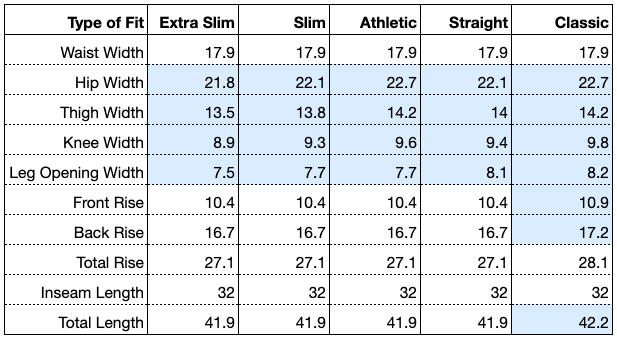
Below is a size chart detailing how the specific trouser dimensions change with the various pant fit options. This chart applies to our Standard Sizes only.

A chart of pant fit comparisons for size 34 x 32

Dress Pant Fit Comparison (34 x 32)

Advanced Tips for Tailored Jacket Fit

When it comes to the fit of your jacket, the solutions to some common issues are tough to identify. Here’s what our experts say you should keep in mind when you’re modifying the fit of your jacket.

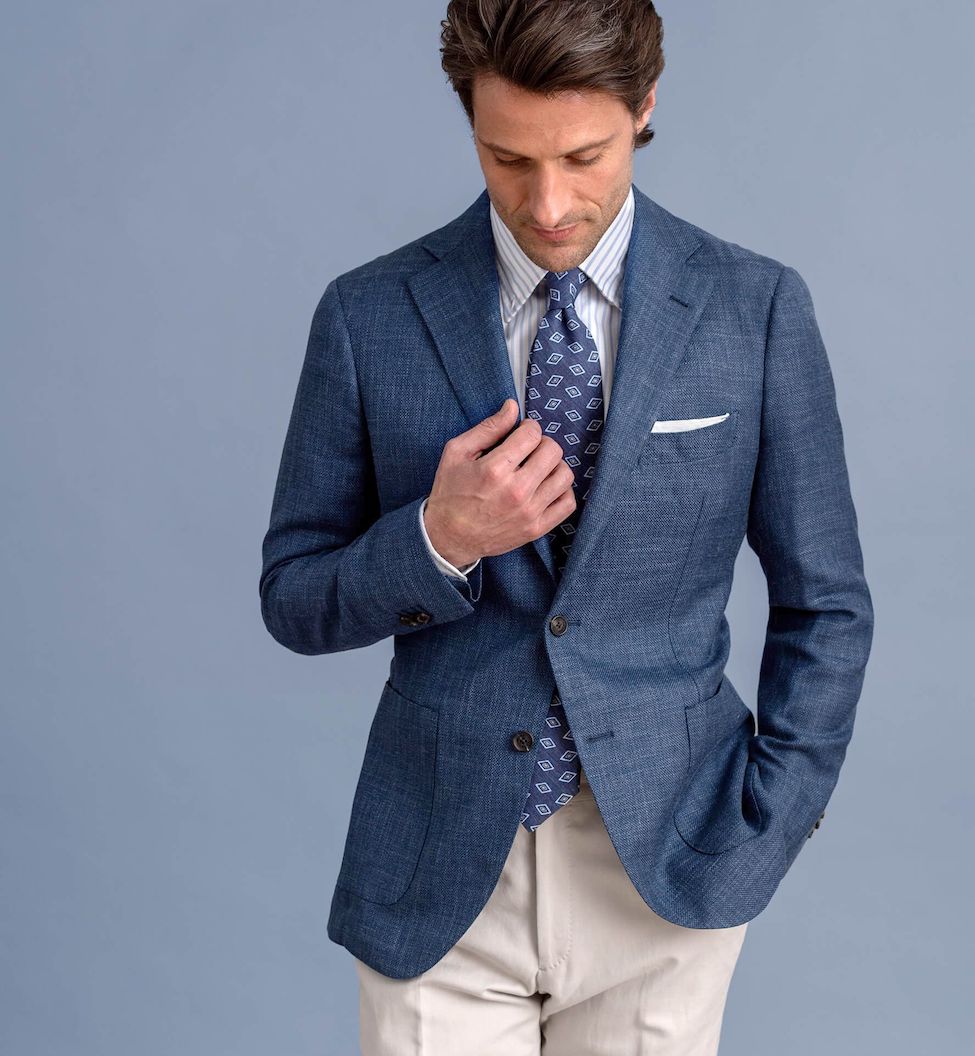
Example of a good fitting tailored jacket.

1. Shoulder Width

The shoulder width is arguably the most important part of a jacket’s overall fit, as it gives an immediate impression of how well the jacket fits the wearer. The seams at the top of the sleeves should land just past the ends of your shoulders. A bump in the upper sleeve will appear just below this seam if the shoulder width is too short, and a dent will appear in the upper sleeve just below this seam if the shoulder width is too wide.

2. Sleeve Width

Whether you choose a classic fit or a slim fit, the upper part of your sleeves will limit your range of motion to some degree. Aim for a look that follows your arms closely and still has enough room for you to move your arms normally.

3. Sleeve Length

When considering the length of your jacket sleeve, you must also consider the length of your dress shirt sleeves. The end of your dress shirt sleeve cuffs should reach just beyond the wrist bone when your arms are at rest at your sides and the cuffs are buttoned. The edge of your jacket sleeve should land right on the wrist bone, exposing 0.25”- 0.5” of your dress shirt cuffs. Showing less shirt cuff will result in a more conservative look, and more will give you a more modern look.

4. Chest Width

The jacket should drape cleanly over your chest and down to your midsection without the interruption of wrinkles or folds in the fabric. There should be enough room in the chest to allow the lapels to lay flat. If the lapels bend outward and create a space between the jacket and the shirt, the chest width is too tight. Tension in the upper back and underarms can also result from a tight chest width, so you may also need to increase it if you’re experiencing these issues.

5. Midsection Width

The jacket’s midsection should lay smooth and with a clean taper over your stomach and hips. A tight midsection width will cause tension lines to appear around the buttons when the jacket is buttoned up, and the fabric will catch in horizontal wrinkles across the lower back.

6. Center Back Length

With both arms at rest at your sides, the center back length of your jacket should reach the base of the seat (rear) and the base of the trouser fly (front). This rule is fairly loose, however, and the actual fit will depend on the wearer and the look they’re going for. A shorter jacket length makes for a more modern style, whereas a longer length is more on the classic side.